Hi there, Suzy. The message "We are fetching your data" is due to potential browser-related or connectivity issues. Let's delve into the troubleshooting process to resolve these roadblocks. I'll ensure you have a smooth experience while using QuickBooks Self-Employed (QBSE).
Before anything else, can you please specify where you encountered this message and what you are trying to do? These additional details will help me provide a possible solution.
For now, verify your internet connection is stable. Log out of your account, close the browser, and sign back in.
If the issue persists, let's open your account using an incognito window to eliminate the possibility of a webpage issue. Here are the following keyboard shortcuts:
- Google Chrome and Microsoft Edge: Ctrl+ Shift + N
- Mozilla Firefox: Ctrl + Shift + P
- Safari: Command + Option + P
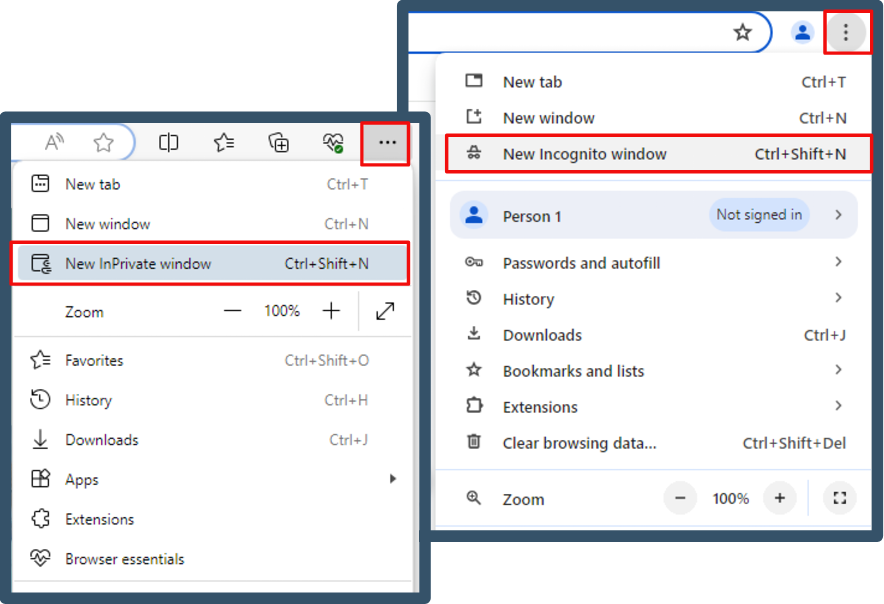
If it's a success, return to your regular browser. Then, clear your cache to start afresh. If the issue remains, consider switching to other supported browsers installed on your system.
Moreover, you might want to learn additional information on managing your business transactions, Schedule C categories, and tax payments. Kindly refer to this article: QBSE Overview.
Once you've tried the troubleshooting steps, let me know how everything unfolds. Please hit the Reply button below to communicate any questions concerning your QBSE account. Best wishes, Suzy!




