Turn on suggestions
Auto-suggest helps you quickly narrow down your search results by suggesting possible matches as you type.
Showing results for
Get 50% OFF QuickBooks for 3 months*
Buy now
Hello there, bobby22. We can troubleshoot this one.
Just to confirm, do you mean a Memo field is showing when previewing an invoice? If so, we can start refreshing your browser by clicking the Reload icon or pressing F5 on your keyboard since you didn't create this one.
Log in to your account through an incognito window. This doesn't use the existing cache files, which makes it a good place to determine if there's an issue with the browser. Here are the keyboard shortcuts:
If there's no memo appears, let's clear the cache of your main browser. This helps the program to work efficiently. Also, you can use other compatible browsers. Check this article for more details: System Requirements For QBO.
For more details about handling sales forms in QBO, you can check these articles below:
Visit here again if you have additional questions. I'd be glad to have you back and continue to help you with your QuickBooks concerns. Take care and stay safe.
Hi bobby22,
Hope you’re doing great. I wanted to see how everything is going about the memo showing on the invoice. Was it resolved? Do you need any additional help or clarification? If you do, just let me know. I’d be happy to help you at anytime.
Looking forward to your reply. Have a pleasant day ahead!
Hi,
Thank you for checking, no that didn't work either. We still have not been able to figure it out.
Hey bobby22,
Thank you for checking in back with us! Since you have done all those troubleshooting steps and the matter is not corrected, I recommend contacting our Support Team. They have the instruments to do things such as screen sharing to get a better look at what is happening and make a diagnosis. Here's how to connect with us:
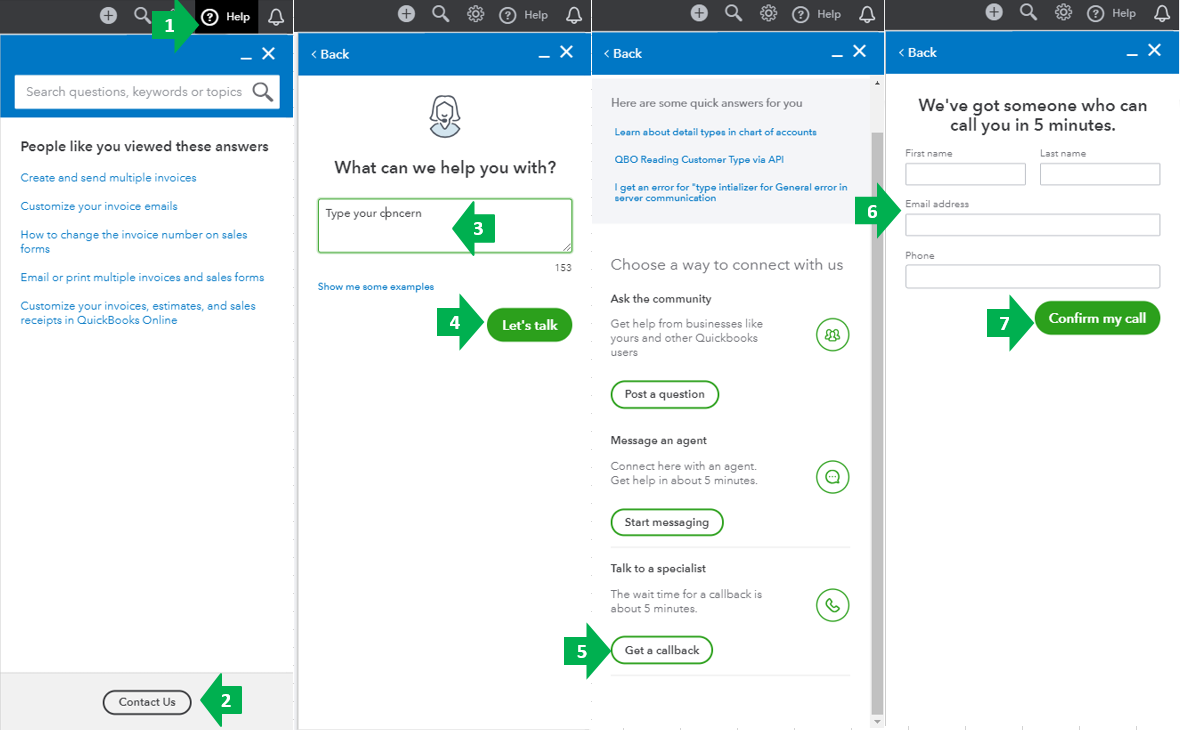
The Community always has your back, and I would also be happy to help with your questions as well. I’m just a few clicks away should you need anything. Take care.


You have clicked a link to a site outside of the QuickBooks or ProFile Communities. By clicking "Continue", you will leave the community and be taken to that site instead.
For more information visit our Security Center or to report suspicious websites you can contact us here


