Get 50% OFF QuickBooks for 3 months*

Buy now
cancel
Showing results for 
Search instead for 
Did you mean: 
Announcements
Simplify payday and set payroll to run automatically on QuickBooks. Explore QuickBooks Payroll
george15
Level 1

How do I combine two sales tax names? I have Maine State and state.

 
2 Comments 2
NicoleAscencionS
Moderator

How do I combine two sales tax names? I have Maine State and state.

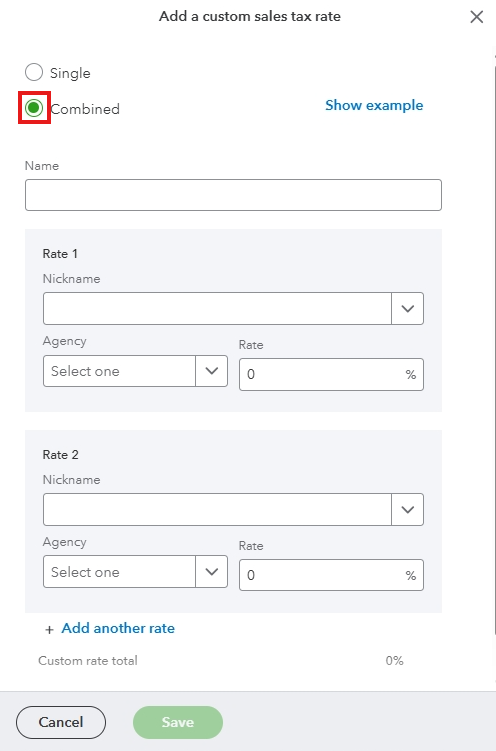
You can combine two sales taxes by adding a custom rate, George.


Here's how:


  1. Navigate to Taxes, then Sales tax.
  2. Select the dropdown beside Add agency.
  3. Click Add custom rate.
  4. Tick Combine.
  5. Enter the name and necessary details.
  6. Hit Save.


For more details, visit this article: Set up your sales tax in QuickBooks Online.
 

Feel free to return to this thread if you have additional queries about sales taxes.

CRoss4
Level 1

How do I combine two sales tax names? I have Maine State and state.

You can merge two accounts by changing the name of the one you DON'T want to the name of the one you DO want to keep. you will get a message asking if you're sure you want to merge. select "yes".

note, this can't be undone. confirm that there are not the same transactions in each account, but different dates. 

Need QuickBooks guidance?
Log in to access expert advice and community support instantly.

Need to get in touch?

Contact us