Turn on suggestions
Auto-suggest helps you quickly narrow down your search results by suggesting possible matches as you type.
Showing results for
Get 50% OFF QuickBooks for 3 months*
Buy nowHello, Bob.
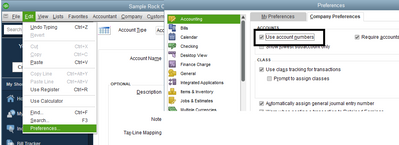
I'm happy to help you re-enable the account numbers in QuickBooks Desktop.
You'll want to go to your Preferences to enable account number feature. Here are the steps:
If you need to add an account number to your existing accounts, you'll want to follow these steps:
You can learn more about managing your Chart of Accounts here: Learn about the chart of accounts in QuickBooks.
If you're using the Online Bank Feeds in QuickBooks, you can read this article in case you need help managing your bank transactions: Add and match Bank Feed transactions in QuickBooks Desktop.
Need more help managing your Chart of Accounts? Please let me know what you need to accomplish. I'm always here to assist. If you have questions about other processes in the Desktop platform, you can add them to your reply.