Turn on suggestions
Auto-suggest helps you quickly narrow down your search results by suggesting possible matches as you type.
Showing results for
Get 50% OFF QuickBooks for 3 months*
Buy nowI'm glad you ask this question and you've come to the right place, wade19.
I can tell why the Transaction List by Tag Group report shows no data when filtered by Ungrouped tags.
When searching on an ungrouped tag, you get a list of all the transactions that contain that tag. In your case, transactions are using tags that are linked to a Tag group. That's why the report doesn't contain any data.
I'm adding these sample screenshots below to see the difference.


To see a report that shows a list of untagged transactions, you can pull up and customize the Profit and Loss by Tag Group report. Here are the steps you can follow.
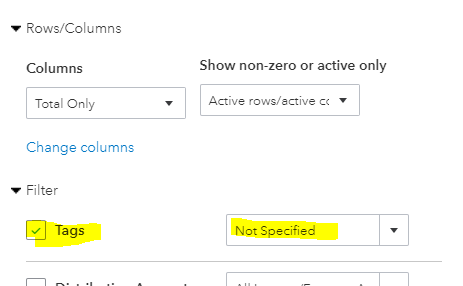
Once done, select the amount in each account to open a detailed report showing your untagged transactions. From there, you can open each entry and assign a tag.
Tags are customizable labels that track transactions however you'd like. To understand how this feature works in QuickBooks, you can browse this site: Implementing Tags in QuickBooks Online. It contains an overview of what Tags are and when to use them.
I updated this post so you can see a report that catches untagged transactions @wade19. I hope this clears up your worries. Keep me posted if you have additional questions while running the Transaction List by Tag Group report. Use the Reply button below and I'm on your side here. May your business grow and bring you prosperity. Best wishes.

