Turn on suggestions
Auto-suggest helps you quickly narrow down your search results by suggesting possible matches as you type.
Showing results for
Get 50% OFF QuickBooks for 3 months*
Buy nowThanks for following on this thread, @bg3_llc.
This error occurs when the formatting or the mapping of the CSV file is incorrect. I have a few steps you can try to fix the issue.
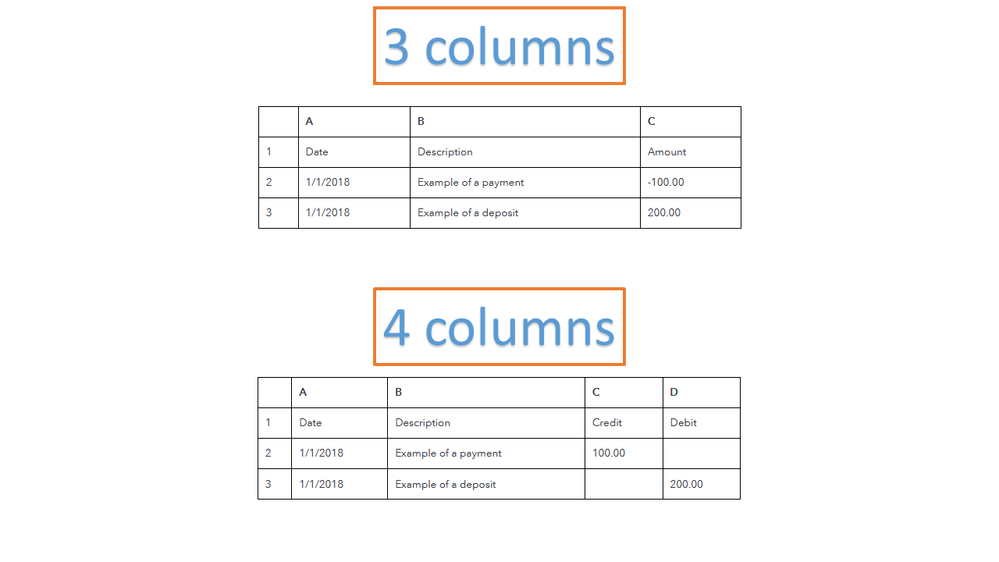
First, check the format of your file. QBO can import CSV files that use either a 3-column or 4-column type.
Next, let’s review the information and make sure it doesn’t contain any of the following characters.
After reviewing the entries, you can start importing them. For some tips on how to successfully bring in bank data into QBO, check out the Import bank transactions article.
If there’s anything else I can help you find in QuickBooks, leave a comment below. I’m here to assist further and make sure you’re taken care of. Have a great rest of the day.