Turn on suggestions
Auto-suggest helps you quickly narrow down your search results by suggesting possible matches as you type.
Showing results for
Get 50% OFF QuickBooks for 3 months*
Buy nowHello, userpedendairy.
I have some information regarding the downloaded bank transactions. I'll also help you edit their dates.
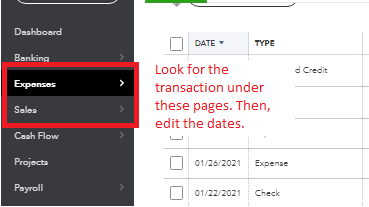
QuickBooks Online depends on the data sent by the bank. We're unable to change the date directly from the Banking page. However, you can edit the date after matching, adding or categorizing the downloaded bank transaction.
Simply open the transaction in the Expenses or Sales page, then edit the date.
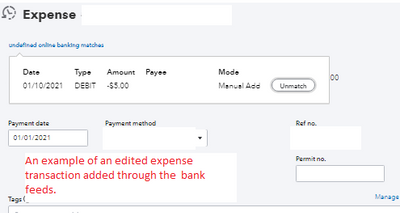
The transaction won't be unmatched or transferred backed to the Banking page. They will still have the indicator that they have been added or matched from the bank feeds.
Note: Be very careful when doing this since it might cause discrepancies between your bank statement and QuickBooks records. I recommend consulting an accountant so they can give you the best advice on handling changes on the dates.
When you're ready to reconcile your bank, you can check this article for the workflow: Reconcile an account in QuickBooks Online.
Do you have any other questions for QuickBooks Online? Ask away in the reply section below and I'll help you out.