Turn on suggestions
Auto-suggest helps you quickly narrow down your search results by suggesting possible matches as you type.
Showing results for
Get 50% OFF QuickBooks for 3 months*
Buy nowI can help you with fixing the discrepancy in your reconciliation, @WJR86.
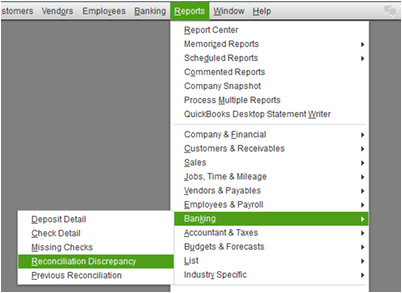
To help us identify the discrepancies, we can run the Reconciliation Discrepancy Report. This report shows transactions sorted by statement date that were changed since the last reconciliation. Before doing this, back up your company file first.
Here's how:
1. Go to the Reports menu.
2. Hover on Banking, then select Reconciliation Discrepancy.
3. Choose the bank account, then click OK.
If there are transactions that cause the discrepancy between your balances, edit them with the correct details (or recreate deleted ones). Before doing this, back up your company file first.
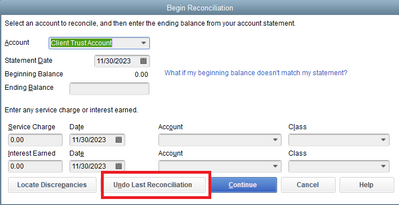
Once done, undo the previous reconciliation:
1. Go to the Banking menu.
2. Select Reconcile.
3. Choose the bank account, then click Undo Last Reconciliation.
Finally, correct the previous period by reconciling it again.
To learn more about the different ways of fixing Reconciliation discrepancies, you can check out this article: Fix Reconciliation Discrepancies.
Moreover, here's an article you can read more about reconciling previously deleted and re-entered checking or credit card transactions: Reconcile credit card transactions.
I'm still here if you have additional questions and you're more than welcome to leave a reply for anything you need.