Turn on suggestions
Auto-suggest helps you quickly narrow down your search results by suggesting possible matches as you type.
Showing results for
Get 50% OFF QuickBooks for 3 months*
Buy nowHello @Tummy31,
Thank you for reaching out about your bank connection issue in QuickBooks Online. I'm here to help you get rid of the error message so you can download your bank transactions automatically.
Bank error code 105 happens when there's a problem on your bank's end. Their website may be undergoing some maintenance or have server issues. Issues like this can stop the online bank connection with QuickBooks.
There are troubleshooting steps you can perform to isolate and fix the problem. If you've previously connected your bank, you should have an option to update the connection within the Banking section.
Here's how:
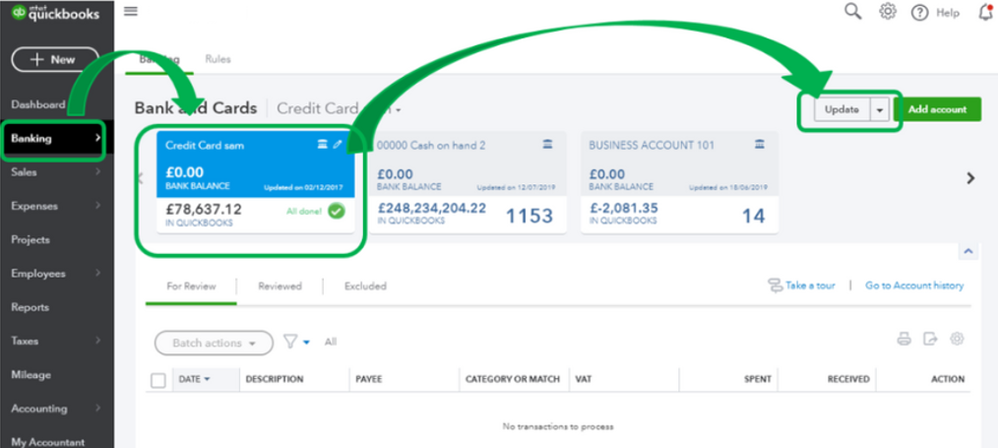
If updating the connection isn't an option, please log in to your bank's website outside QuickBooks. Review your access to the website and check for any notifications that require your approval (connecting to third-party apps).
I also want to share this resource you can use in the future if you get banking errors in QuickBooks: What to do if bank transactions won’t download or there's a bank error.
Please don't hesitate to drop by here in the Community if you need help with QuickBooks Banking. I'll be happy to help you some more.

