Turn on suggestions
Auto-suggest helps you quickly narrow down your search results by suggesting possible matches as you type.
Showing results for
Get 50% OFF QuickBooks for 3 months*
Buy nowI hear your sentiments, @Western. Please know this isn't the impression we'd like you to have. Rest assured, I'll help you get around this issue with your bank transactions in QuickBooks Online.
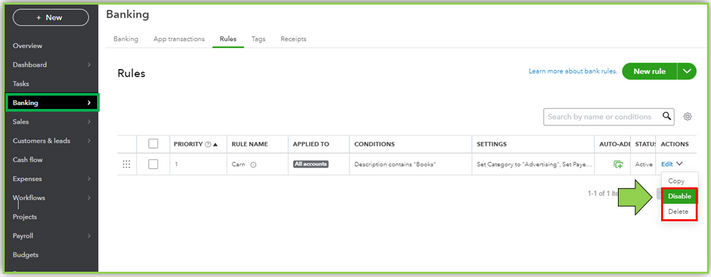
First, we can review your bank transactions if you're utilizing the Banking Rules feature. It is an added feature that automatically categorizes downloaded transactions. It might be the reason why the system is mislabeling your transactions.
To check if you've set up Banking rules, here's how:
Once you've verified if there's a bank rule, we can disable or delete them by ticking the dropdown icon beside the rule. Then manually categorize the transactions and put them in the correct accounts.
When everything is all set, check out these articles for guidance. These can guide you further on how to categorize your transactions and reconcile your account flawlessly:
Feel free to reach out again to keep us posted on your progress. I'm happy to lend a helping hand if you have more concerns about managing your bank transactions. Take care always and best regards.