Turn on suggestions
Auto-suggest helps you quickly narrow down your search results by suggesting possible matches as you type.
Showing results for
Get 50% OFF QuickBooks for 3 months*
Buy nowYes, you can categorize an actual account as 1099 trackable in QuickBooks Online (QBO), JJacobs2. I'll guide you on how to do this below.
If you keep track of all your client's payments under the appropriate 1099 account, the system will surely incorporate them into your tax return. To add the "cost of labor: contract labor" account as 1099 trackable, here's how:
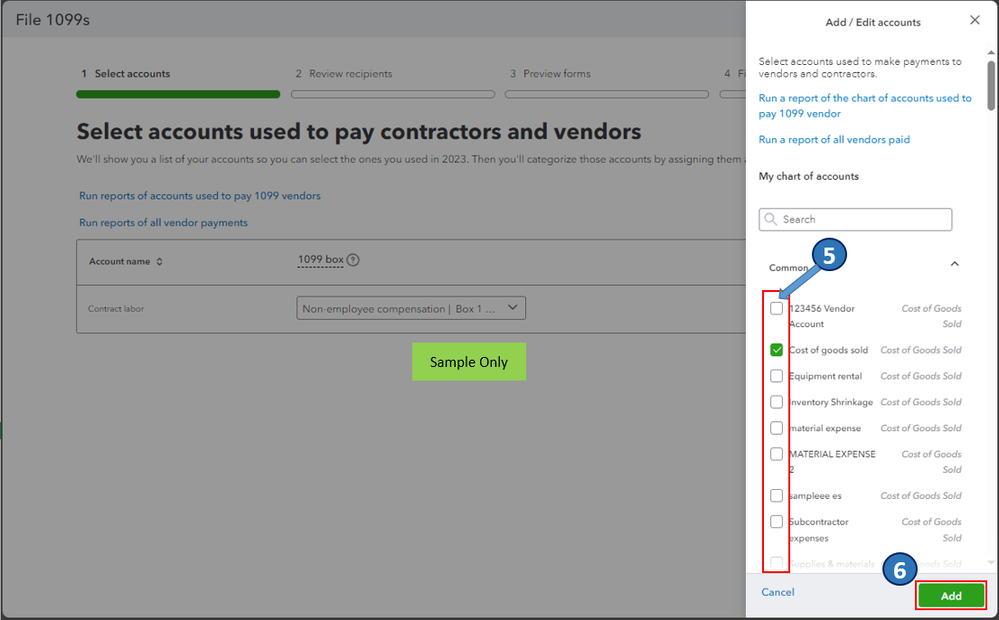
Whenever you're ready to continue preparing your federal 1099s with QBO, please see this article for the step-by-step guide: Create and file 1099s with QuickBooks Online.
Also, I've included this article to answer the most commonly asked questions about 1099s: Prepare for the upcoming tax season.
Please don't hesitate to drop your comment below if you have any other 1099 concerns and account mapping questions in QBO. We in the Community are always here to help you out.

