Get 50% OFF QuickBooks for 3 months*

Buy now
cancel
Showing results for 
Search instead for 
Did you mean: 
Announcements
Simplify payday and set payroll to run automatically on QuickBooks. Explore QuickBooks Payroll

Reply to message

View discussion in a popup

Replying to:
ClaireSamanthaS
QuickBooks Team

Reply to message

You can set up and pay an owner's draw that would allow you to pay the corporate officers, socksoff.


To start, create an Owners' Equity account by following the steps provided below:
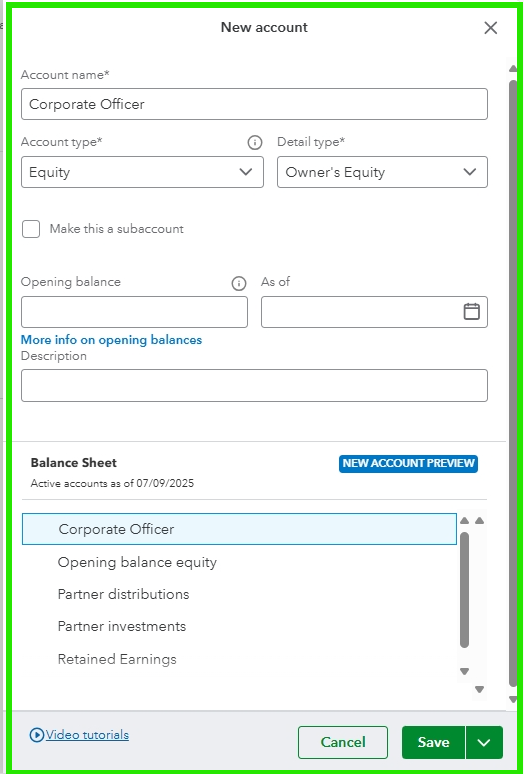
 

  1. Go to the Gear icon, then select Chart of Accounts.
  2. Click New, and enter an Account name.
  3. Choose  Equity or Owner’s Equity from the Account type dropdown and select a Detail type.
  4. Enter the Opening Balance and the starting date in the As of field.
  5. You can add a Description to add extra information about this account. 
  6. Select Save


Once you have successfully created an Equity account, you're ready to generate a regular check for the officer employee in QuickBooks:


  1. Click on + New and choose Check.
  2. Select the Payee from the dropdown menu.
  3. Choose the bank account from which the money will be drawn.
  4. Complete the remaining fields.
  5. Click Save and close.
     

Please feel free to leave a comment below with any other questions; our Community Space is here to assist you.

Need to get in touch?

Contact us