Turn on suggestions
Auto-suggest helps you quickly narrow down your search results by suggesting possible matches as you type.
Showing results for
Get 50% OFF QuickBooks for 3 months*
Buy nowHey there, sgmken,
Thank you for the screenshot.
I'd be glad to help you add the CC chargeback to your register in QuickBooks Online.
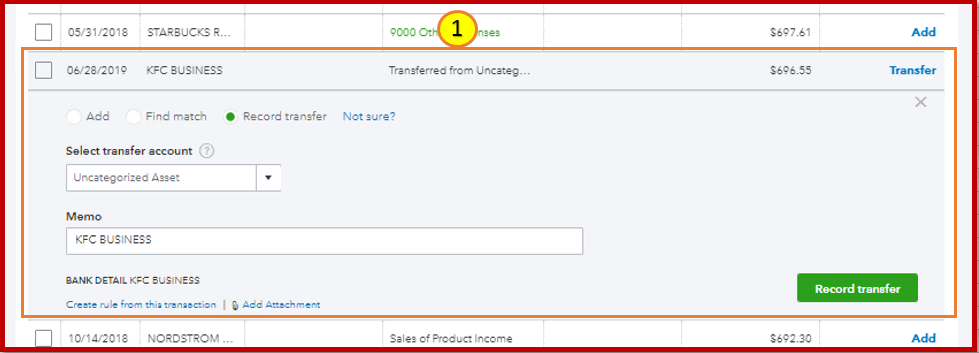
Money movement between bank (asset) or credit card (liability) accounts can be represented by Transfer, Expense, or Deposit transactions. Credit card payments and inter-bank transfers are generally recorded with a Transfer transaction.
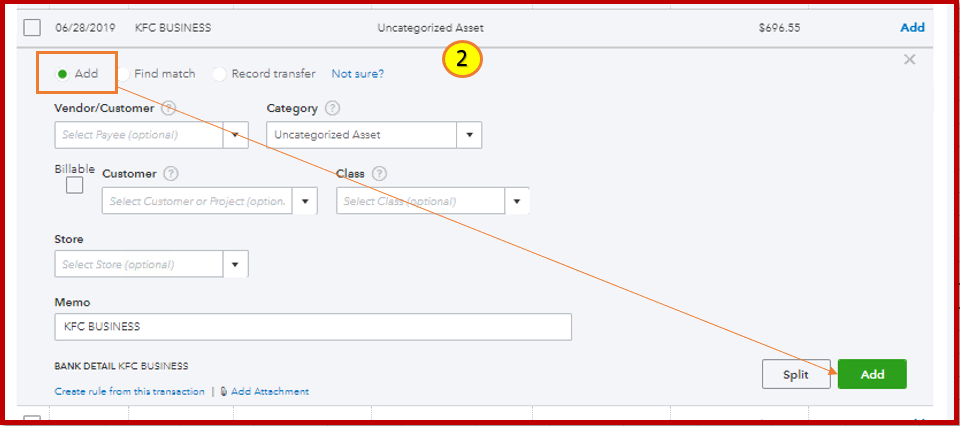
To record the chargeback, click it to expand and choose the Add option. Then, click the Add. Please see attached screenshots below for your guidance.
You can also categorize the item before adding it to your account. Feel free to read through this article for instructions and detailed steps: Assign, categorize, edit, and add your downloaded banking transactions.
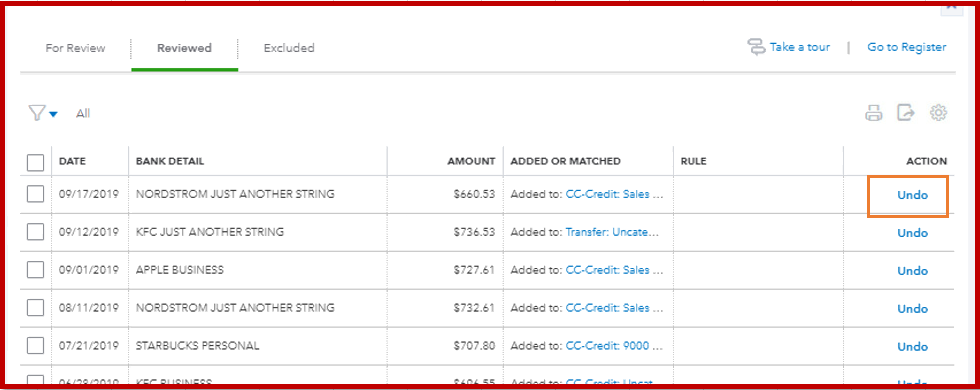
After that, go to the Reviewed tab to see transactions you've recently added. You can click the Undo button to start over.
Keep me posted if there's anything else you need and I'll get back to you.