Turn on suggestions
Auto-suggest helps you quickly narrow down your search results by suggesting possible matches as you type.
Showing results for
Get 50% OFF QuickBooks for 3 months*
Buy nowHello, JRCrawford.
Thank you for choosing QuickBooks as your Accounting software. In QuickBooks, the receipts will stay in your account unless removed or deleted.
This new feature added in QuickBooks is a handful, quick, and easy to use.
With Receipt Capture, you and your clients can snap and store receipts digitally in QuickBooks Online to save hours of labor. Once receipts are uploaded to QuickBooks Online, they are automatically categorized and matched to transactions. Everything is organized and ready at tax time.
Thus, Receipt Capture is currently available to U.S. customers using all versions of QuickBooks Online: Simple Start, Essentials, Plus, and Advanced.
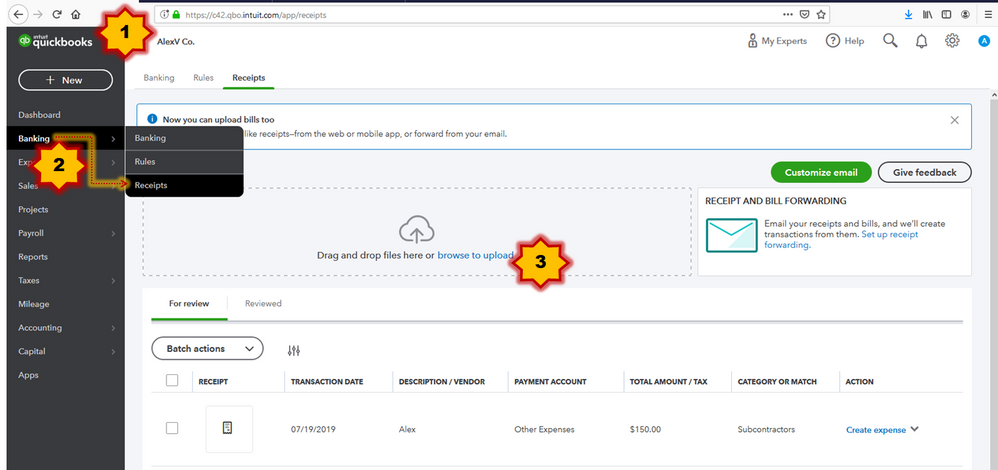
Here's how to receipt capture works. In QuickBooks Online, you can add receipts in three different ways:
Use a web browser to add receipts and bills.
Note: Each image or file should only contain a single receipt or bill.
Once submitted, QuickBooks Online reads the receipts, extracts the information, and automatically matches the receipt to a transaction. And, if there’s no match found, you can easily create a new transaction.
For more detailed steps and information, please refer to this article: Capture and categorize receipts and bills.
That's it! Super easy and handy. Please let me know if you have any other questions in QuickBooks. I'll be around here in Community to help you further. Have a wonderful day and stay safe!