Turn on suggestions
Auto-suggest helps you quickly narrow down your search results by suggesting possible matches as you type.
Showing results for
Get 50% OFF QuickBooks for 3 months*
Buy nowIt's wonderful to welcome a new face to our Community space, R365. I'd be happy to guide you through the process of paying multiple invoices from several vendors at once based on location. This process can streamline your workflow and ensure all payments are handled efficiently. I'll make sure everything is clear and straightforward.
In QuickBooks Online (QBO), you can utilize the Filters option to pay vendor bills simultaneously. Once these are applied, it will be easier to batch-select the transactions and proceed with the payment. Here's how:
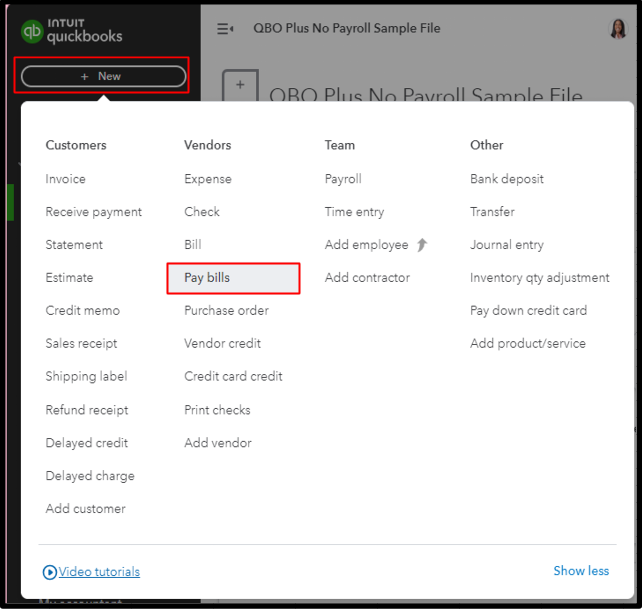
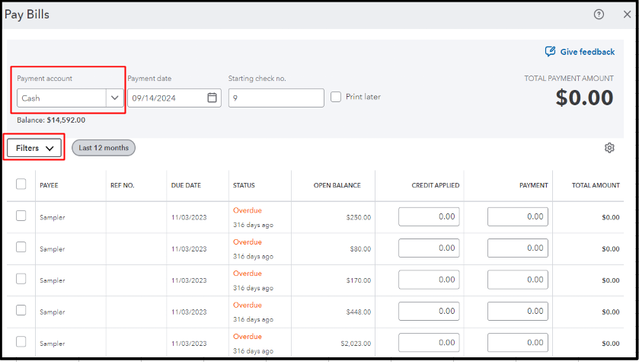
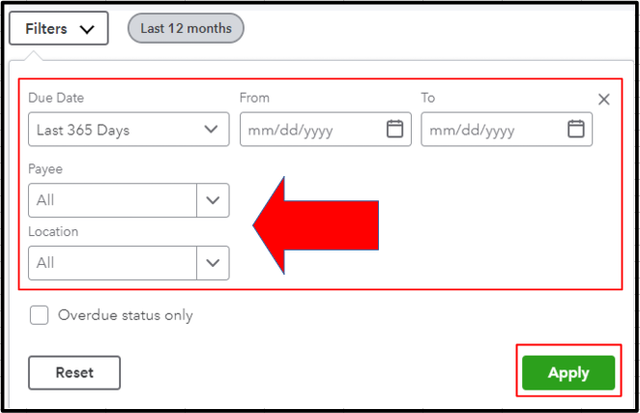
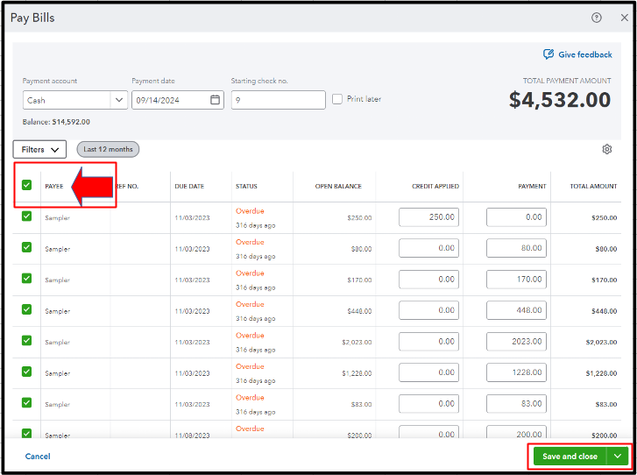
By completing these procedures, we ensure vendor payments are processed effectively in one go. This comprehensive approach helps manage multiple invoices from various vendors seamlessly, maintaining accurate financial records and ensuring timely payments. If you encounter discrepancies during the process or have further questions, please do not hesitate to reach out by leaving a comment below. I strive to provide comprehensive support, R365.

