Turn on suggestions
Auto-suggest helps you quickly narrow down your search results by suggesting possible matches as you type.
Showing results for
Get 50% OFF QuickBooks for 3 months*
Buy nowI'm here to assist you in recovering the pop-up box that appears when saving an invoice for a customer with available credits, Cascade.
Firstly, it's possible that the "Do not display this message in the future" option was accidentally selected, which could be the reason why the pop-up box is no longer visible. I'll share a screenshot below for your reference.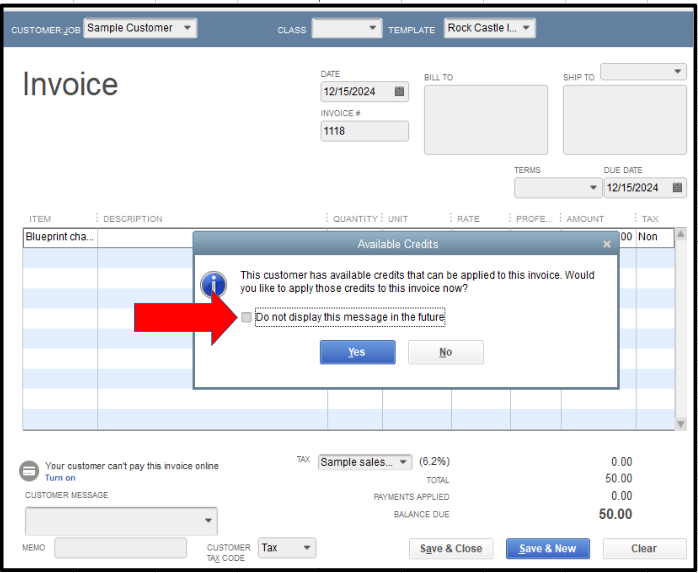
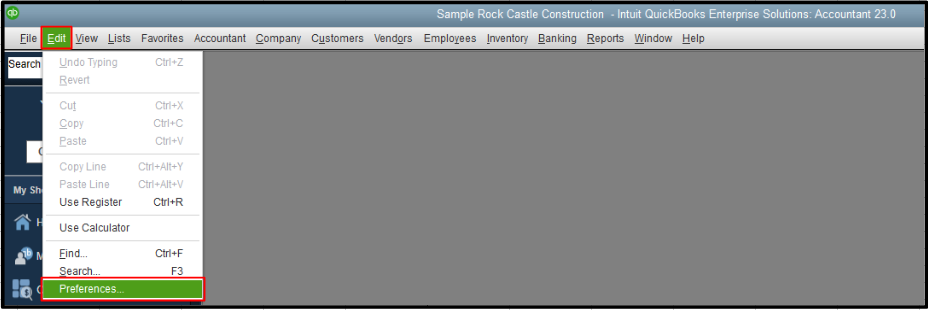
To bring it back, please follow the steps below:
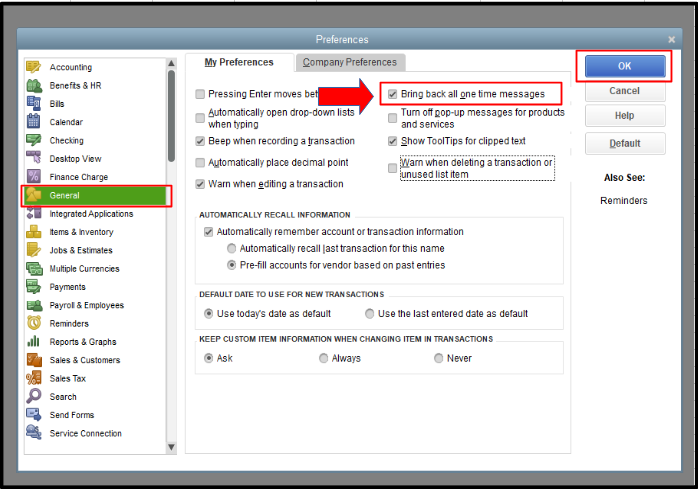
Then, generate an invoice for a customer with available credits and save it. The pop-up box will now appear again.
Additionally, I'll share this resource to aid you in recording invoice payments from your customers in QuickBooks Desktop (QBDT): Receive Payment.
If you have other questions about managing invoices or certain preferences in QBDT, comment below. The Community team is always here to provide assistance.

