Turn on suggestions
Auto-suggest helps you quickly narrow down your search results by suggesting possible matches as you type.
Showing results for
Get 50% OFF QuickBooks for 3 months*
Buy nowWelcome to the Community space, @Zippy33. I'll provide details and outline the steps to remove duplicate deposits in your QuickBooks Online (QBO).
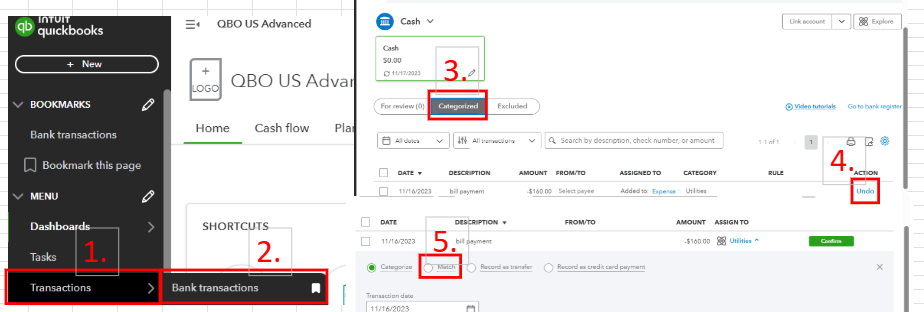
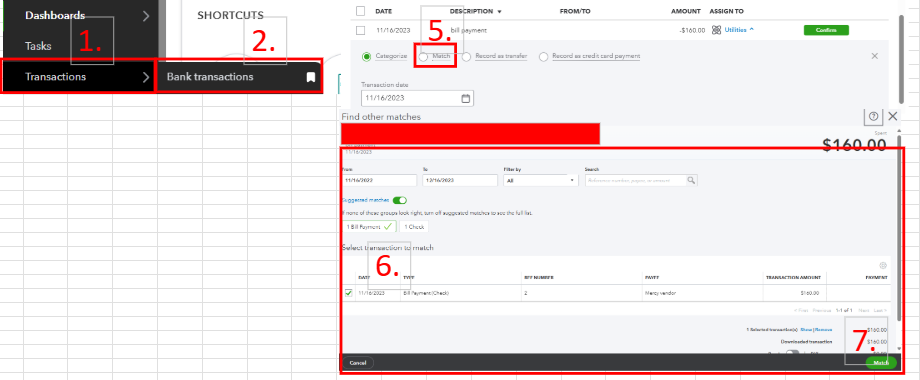
If this happened on your Banking page and you categorized the deposit, you'll want to undo it and consider matching the bank deposit to the transaction. By doing so, duplicates will not appear in your QBO company. These are the steps:
For visual reference, see the screenshot below.
Another workaround is to check the bank register in your chart of accounts and from there. Locate the duplicate transaction and manually delete it.
To prevent this situation from happening in the future, double-check each transaction that goes into your QBO account before categorizing them. By doing so, you can spot possible copies of those bank transactions and exclude them.
Furthermore, you can visit this handy article to help you reconcile bank accounts in QBO: Reconcile an account in QuickBooks Online.
Need assistance managing multiple transactions inside your QBO company? Our QuickBooks Live Expert Assisted can offer tips and guide you to streamline the process of handling this task.
I am here to help you with your QuickBooks questions, so feel free to use the comment section. I can promptly respond and help you with bank deposit concerns. Keep safe.

