Turn on suggestions
Auto-suggest helps you quickly narrow down your search results by suggesting possible matches as you type.
Showing results for
Get 50% OFF QuickBooks for 3 months*
Buy nowI can help you generate this report in QuickBooks, John.
In QuickBooks Online, you can run the Sales by Product/Service Detail report to track your purchased products. You just need to select each transaction to view the customers' addresses.
Here’s how:
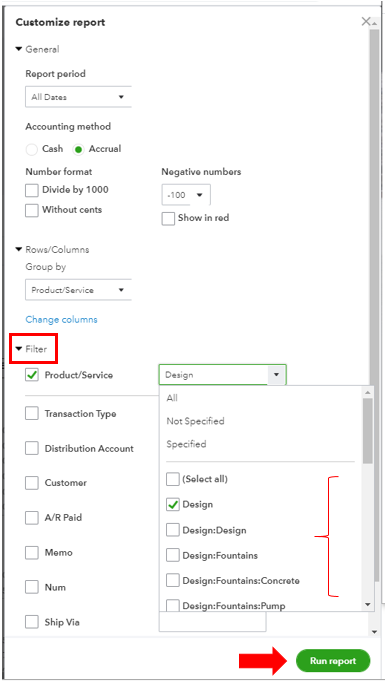
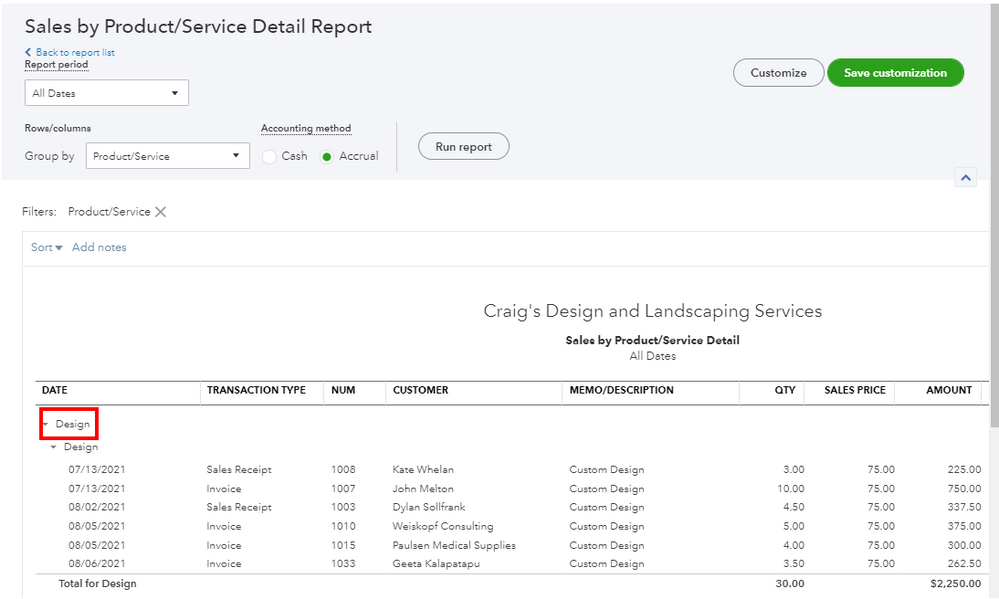
You can export them to Excel so you can add a column for the customer address. This way, all information you need is in one sheet only.
I’ve attached a reference in case you want to keep the same report settings for future use: Memorize reports in QuickBooks Online. It helps you access the information quickly to save time.
If you have other reports' concerns or questions, just add them to your reply. The Community team is always here to help. Take care!

