Turn on suggestions
Auto-suggest helps you quickly narrow down your search results by suggesting possible matches as you type.
Showing results for
Get 50% OFF QuickBooks for 3 months*
Buy now
@MariaAlmaT wrote:Thanks for the quick response, @sabrinasfaraujo.
I appreciate you clarifying your issue. I have some information to add to detail the steps in matching split payments to the open invoices.
For online payments, you can only apply one bank transaction to multiple invoices. There's not a way to match split bank payments to a single invoice.
If this is your case, just exclude the split transactions and manually clear the payments from the register. To close the invoices, follow the detailed steps below:
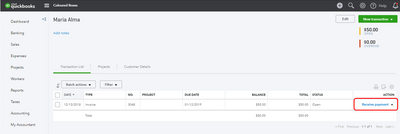
You'll need to use the Receive Payments to pay the invoices.
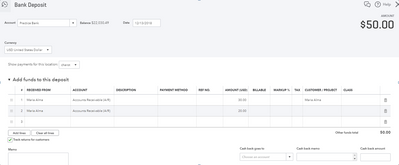
Then, make a split payments through the Bank Deposit window.
Go to the Accounting tab and manually clear the bank deposit transactions from the account register.
With this information, you should be able to close invoices with the split payment transactions. Let me know how this goes after following the steps above. If you have other questions, don't hesitate to leave a comment below. I'd be glad to answer.
Can a customer split or pay for an ACH bank transfer with multiple bank accounts?