Turn on suggestions
Auto-suggest helps you quickly narrow down your search results by suggesting possible matches as you type.
Showing results for
Get 50% OFF QuickBooks for 3 months*
Buy nowHello there,
I'm here to help share an option on how to record a non-refundable downpayment in QuickBooks Online (QBO).
QuickBooks doesn't have an option to mark the Accounts Payable (A/P) as billable, what you need to do is create a bill or check for your vendor with the downpayment amount and mark it as billable to link with your customer. And since QBO cannot identify if it's a non-refundable, you can add a note on the memo field instead.
To create a bill, here's how:
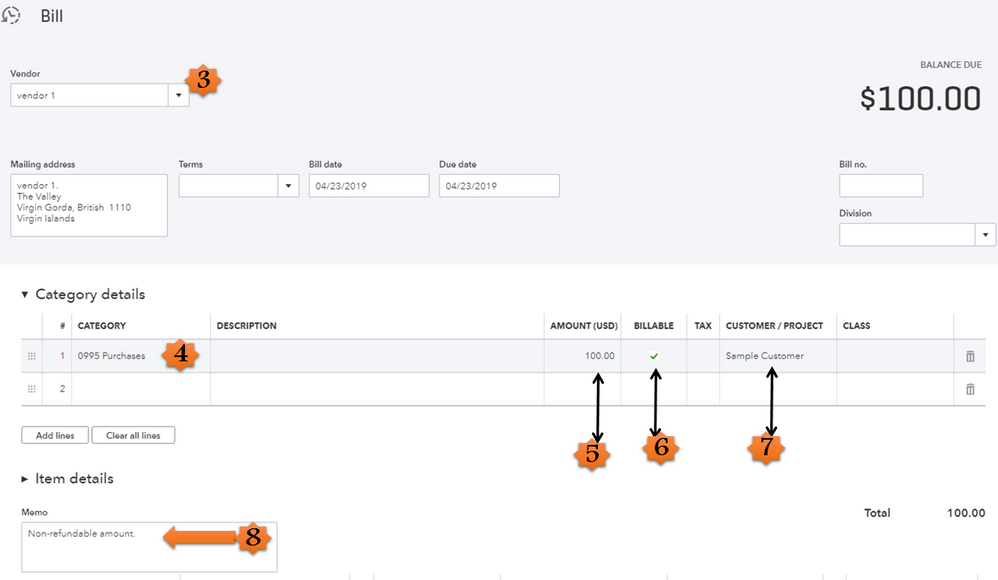
If you'd like to write a check, you can visit this article for the detailed steps: How to write checks.
Once done, you can now create an invoice to the customer to link the billable bill/check you've created.
If you need further assistance with the steps, I encourage you to contact our QuickBooks Online Support so they can do a screen-share.
Here's how you can contact our customer support:
That should do it! Fill me in if you have additional questions about recording a downpayment in QBO. Wishing you and your business continued success.

