Turn on suggestions
Auto-suggest helps you quickly narrow down your search results by suggesting possible matches as you type.
Showing results for
Get 50% OFF QuickBooks for 3 months*
Buy nowGood day, Answer2019.
Helping you change the customer's profile is my priority. Let's get this set up.
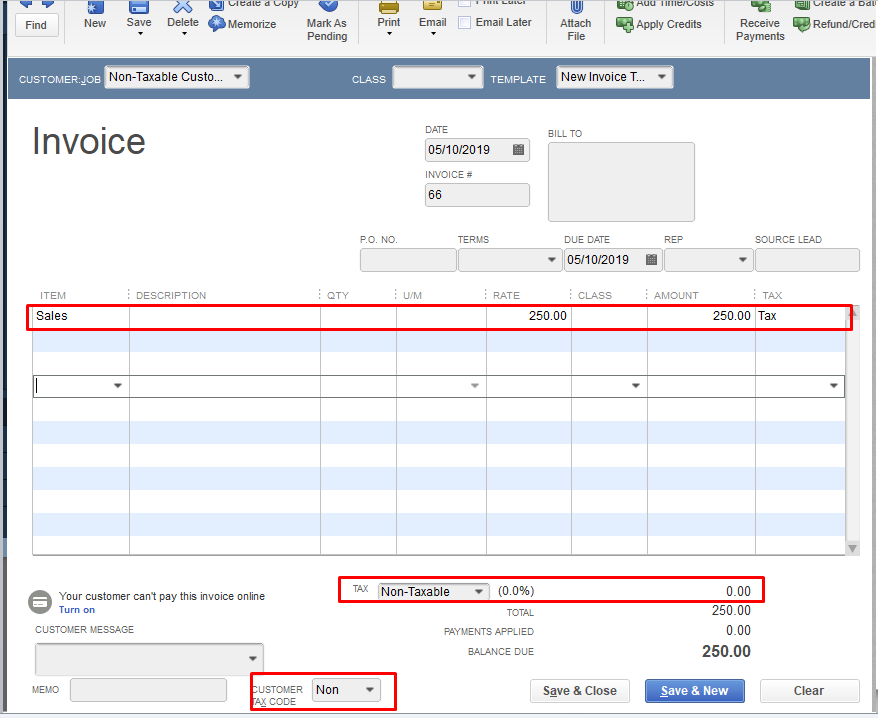
To change the customer's profile into Nan-Taxable, you can set a default 0% for the tax code for your tax-exempt customer. You will first need to create a Non-Taxable item and assign it to your customer.
Here's how:


After that, you can assign the item to the customer's profile. See the steps below:

Even if you assign a taxable item for the tax-exempt customer, it won't calculate since the tax code sets for them is 0%.
You can get more details in this article: Set up sales tax in QuickBooks Desktop.
Let me know how it goes by leaving a reply below. I'll stick around if you need more help. Have a good one.