Turn on suggestions
Auto-suggest helps you quickly narrow down your search results by suggesting possible matches as you type.
Showing results for
Get 50% OFF QuickBooks for 3 months*
Buy nowGood day,
i have been entering INvoices, then applying payments which create my sales for my company. THe accountant who does my Reviews asked me to post general ledger entries so that my vat ,sales and cash accounts are showing up in reports for her.
Since i have been doing this , my reports are now showing double sales figures,which means that now i have to go in and delete the invoices in order for the report to show correct sales, but that now means i dont have a sales report for sales by item summary.
Now i have to do a custom transaction detail report, which shows me general sales per month. IS this the only way that i an do this as i would like to have graphs showing my item, summary item lists for seeing how things are . being sold.
I have us version and havent been wanting to spend $$ on UK version for vat. ANy help would be so appreciated.
here is my current char of accounts i use and their type:
accounts used for vat , general ledger posting
CASH- Other asset (DR)
Vat Out -other current liability (CR)
Sales- Equity (CR)
Posting sales:
Create Invoices - I enter Sales and item amounts on the invoice here
Receive payments - this is how i would receive sales from the invoice
When i print a report
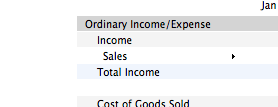
shows in report
income :
sales
general ledger
-------
total income = sales + gl entries
Solved! Go to Solution.