Turn on suggestions
Auto-suggest helps you quickly narrow down your search results by suggesting possible matches as you type.
Showing results for
Get 50% OFF QuickBooks for 3 months*
Buy nowThank you for getting back to us here on the Community page, @Anonymous.
Allow me to join the thread and share additional information about running the Transaction List by Vendor report in QuickBooks Desktop (QBDT) Pro 2020.
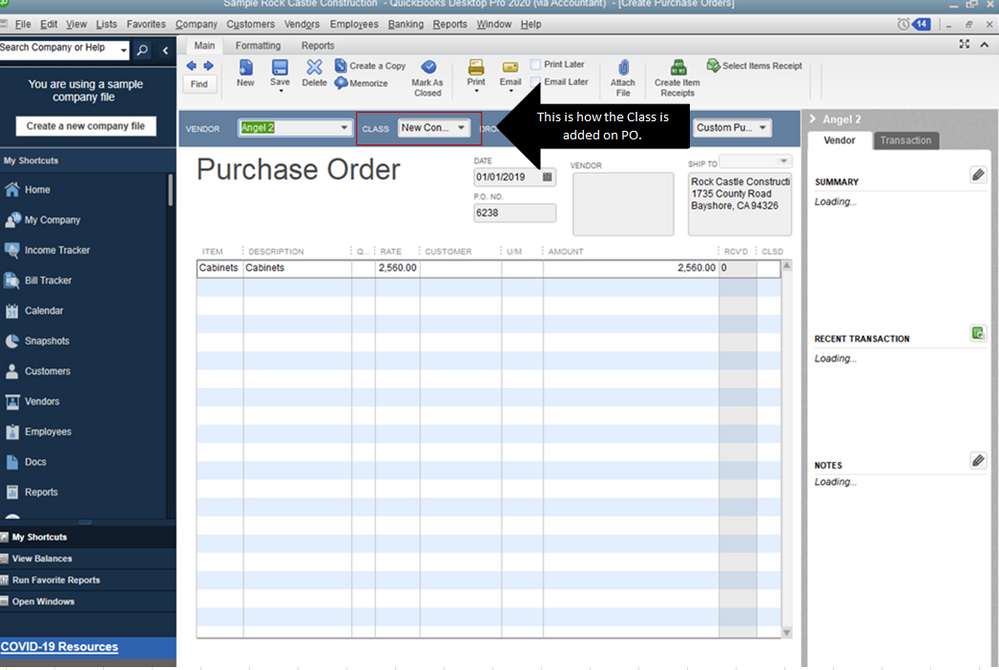
Yes, QBDT Pro 2020 is supported when filtering Transaction List by Vendor report. However, when the class is added as a line item, the transactions won't show up on the report. The report is a transaction type thus the class will only be displayed if it's added at the upper part of the whole transaction.
I've added these screenshots as your visual references.


As a workaround, you can add the class at the upper part of the transaction's page or on the Memo field. Once done, the information will appear in the Memo column.


You can also read the information from this article to learn more about running and customizing reports in QBDT.
If you need to export your reports to Excel in the future, this link also shares the detailed instructions. Consider reading them during your free time: Export reports as Excel workbooks in QuickBooks Desktop.
Let me know if you have any other questions. I'm always here to help. Keep safe!