Get 50% OFF QuickBooks for 3 months*

Buy now
cancel
Showing results for 
Search instead for 
Did you mean: 
Announcements
Simplify payday and set payroll to run automatically on QuickBooks. Explore QuickBooks Payroll

Reply to message

View discussion in a popup

Replying to:
ZuzieG
QuickBooks Team

Reply to message

You can use the Bank Deposits feature in QuickBooks Desktop (QBDT) to manually record your revenue, sales tax remitted, and Shopify processing fees, Bray3214.
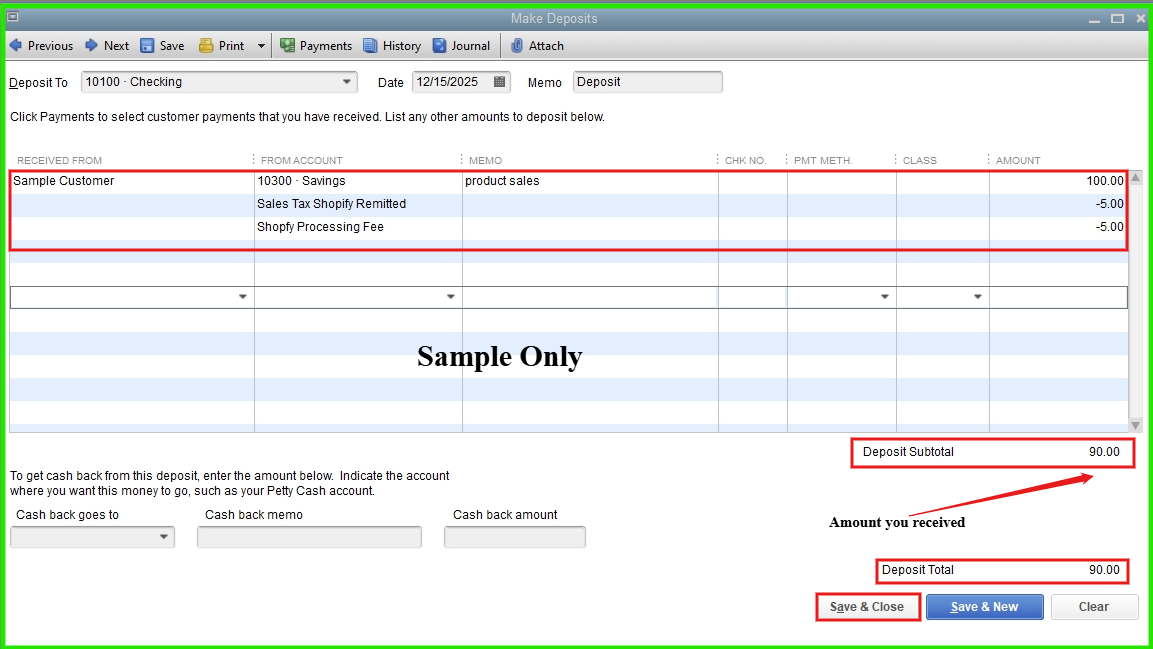
 

  1. On the Homepage, select Banking, then click Make Deposits.
  2. In the Make Deposits window, choose the account where you want to record the deposit from the Deposit To dropdown.
  3. Under Received From, select the customer. In From Account, choose the appropriate revenue account, and enter the total sales revenue in the Amount field.
  4. To record the sales tax remitted and Shopify processing fees, add separate line items as negative amounts to adjust the total deposit to match the actual amount paid to you.
  5. Add a memo if needed for clarity.
  6. When finished, click Save & Close.


I recommend consulting your accountant to ensure proper recording methods, account classifications, and the use of appropriate accounts for deposits and processing fees.


If you have any additional concerns, please don’t hesitate to let us know.

Need to get in touch?

Contact us