Turn on suggestions
Auto-suggest helps you quickly narrow down your search results by suggesting possible matches as you type.
Showing results for
Get 50% OFF QuickBooks for 3 months*
Buy nowThanks for your prompt response, @Roie.
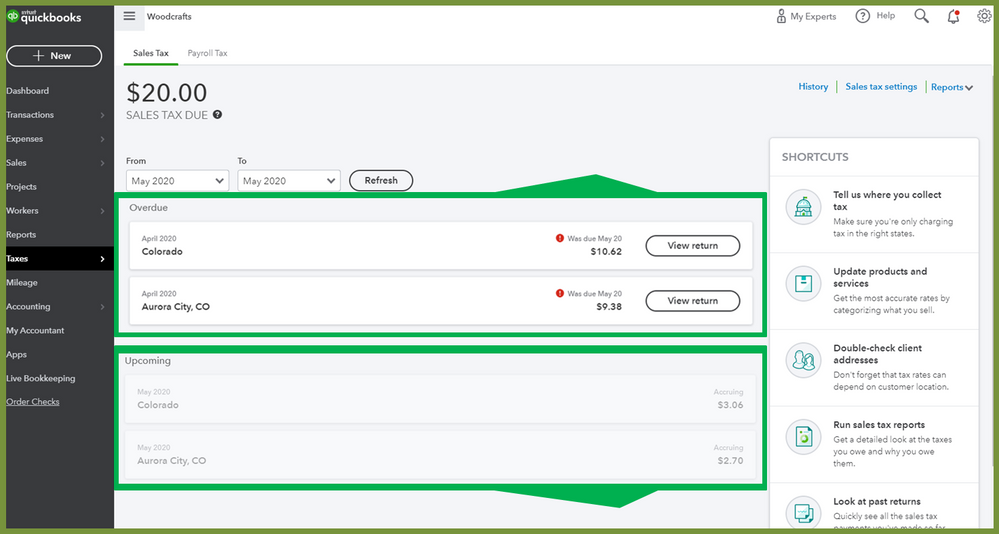
Your sales taxed owed will be shown under Upcoming event in the Sales Tax tab. Once you have already set up your sales tax and added the right sales tax agency, QuickBooks will then calculate sales tax based on what you sell and where you sell it.
Also, make sure that transactions created have sales tax. You can find it below the sales form and checked the Tax column (invoices, sales receipt, receive credit, and receive credit card credit).
When it's time to pay your sales taxes, it will allow you to create an adjustment to record the sales tax payment correctly by clicking the View return button. Make sure to check your filing schedule in your tax agency. You can also review or change it on Tell us where you collect tax section. There you can turn on and turn off sales tax, add and edit agency and add rate.
I've added a screenshot as your visual reference.
For more details about how QuickBooks Online calculate the sales tax when you make a sale, you can refer to this article: Learn how QuickBooks Online calculates sales tax.
Just in case you wanted to set rules for how to tax a product or service, you can refer to this article: Add sales tax categories to your products and services.
Keep me posted if you have more questions. I'll keep my notifications open. Stay safe and well!