Turn on suggestions
Auto-suggest helps you quickly narrow down your search results by suggesting possible matches as you type.
Showing results for
Get 50% OFF QuickBooks for 3 months*
Buy now
When I click on Taxes/Payroll and choose to manually pay my 941 Weekly, QBO keeps assigning that payment to the wrong bank register. It doesn't matter which bank I choose in the bank account drop down box, it keeps placing it in the other bank
I need it to go to Hancock Bank, but it keeps showing up in the People's Bank register causing that account to appear to overdrawn.

I'll work with you to resolve your 941 weekly payment's assigned bank account in QuickBooks Online (QBO) Payroll, @Wyntons Pest Control. This way, you can keep your payroll account updated.
When you manually pay your weekly 941, it'll automatically be assigned to your default payroll bank account. Let's visit your Accounting Preferences to check. Here's how:
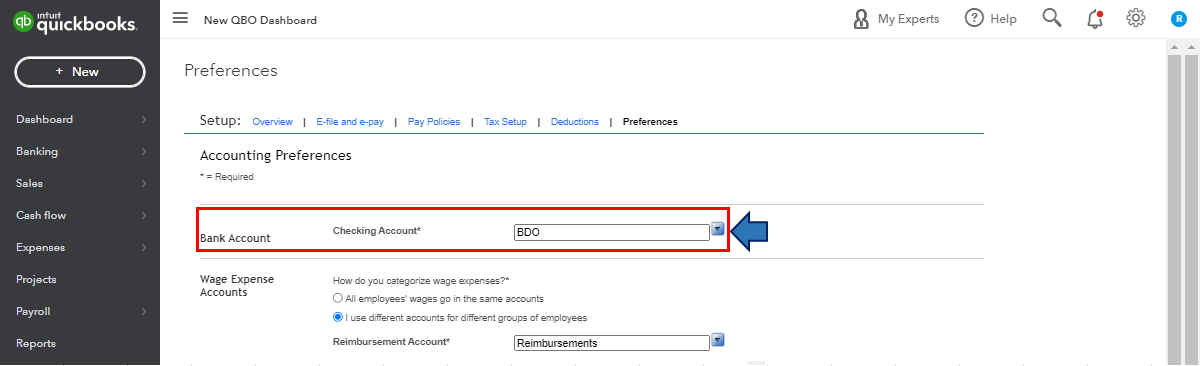
When your payroll account (i.e., Hancock Bank) isn't automatically assigned as the default one when making payments, you can perform some troubleshooting steps. This bank account error can sometimes be caused by the browser's overtime collection of data from frequent page visits. To isolate this matter, you can perform some troubleshooting steps.
You can start by pulling up your QuickBooks Online (QBO) account using a private browser (incognito). Here's how:
Once signed in, go to the Taxes/Payroll menu and choose to manually pay your 941 Weekly.
If you're able to do so using the appropriate bank account, return to your default browser and clear its cache. This will refresh the system and remove older data that causes viewing and performances issue. However, if this matter continues, I'd recommend using other supported browsers.
Also, to learn more about paying and filing your state and federal payroll taxes and how you can wrap up this year’s payroll and prepare for the next with QBO Payroll, I'd recommend checking out these articles:
Let me know if you have other payroll concerns and questions about manually paying your weekly 941 in QBO Payroll. Please drop a comment below, and I'll gladly help. Take care, and I wish you continued success, @Wyntons Pest Control.
Thank you for this information.
Before I follow these steps and make this change, I wish to verify that this will not change the account that my payroll is paid from. I need that to stay on People's. I am only paying the taxes from Hancock.
You're welcome, @Wyntons Pest Control. It's our pleasure to help.
I can share additional information about what happens after changing the bank account from your Payroll Settings.
After performing the steps provided by my colleague, that'll be the bank account your direct deposit and payroll taxes are withdrawn from.
We'll verify your new account with a test transaction within 2-3 business days. It'll be a debit and credit of less than $1.00 from Intuit Payroll Service.
For more information about this process, check out this article: Change your payroll bank account.
If your state requires you to electronically pay and file taxes, you can set up or enroll in E-File & Pay using your online payroll services. If you wish to know more about this, you can check out this article: Setup E-File & Pay.
If you have other concerns in setting your preferences with QBO, please let me know in the comments below. I'll be around to help. Take care always.


You have clicked a link to a site outside of the QuickBooks or ProFile Communities. By clicking "Continue", you will leave the community and be taken to that site instead.
For more information visit our Security Center or to report suspicious websites you can contact us here


