Turn on suggestions
Auto-suggest helps you quickly narrow down your search results by suggesting possible matches as you type.
Showing results for
Get 50% OFF QuickBooks for 3 months*
Buy nowI need urgent help changing my company's Primary Admin.
The Primary Admin can no longer be contacted and we have no way of getting into her account.
Is there a way for me to get it changed? And if so, what information do I need to provide.
Thank you!

Hi, xzhang. Great news! You can still change the admin user even if the current admin is missing or unreachable. I can help you with the process.
If you need to transfer the role to yourself, you can request to be a primary admin by sending a request to our account protection team. If the role is to be changed to someone else (not you), have them do the process instead. Here's what to do:
You can explore the resources in this link for extra tips about the process: Request to be the primary admin or contact.
Once completed, our dedicated team will promptly review your case. When finished, you'll receive an email update regarding the status of your request. Keep an eye out for an email from no_response@intuit.com.
For more insights on changing the primary admin or contact user in QuickBooks, review the details provided in these links:
In addition to the admin role, you may also find more tips while managing your standard or other users from this link: Add and manage users in QuickBooks Online.
If you require further assistance while making changes to the primary admin user in your account, please don't hesitate to ask your questions in the comment section below. I'm here and ready to assist you once more. Have a good one!
Can you still access your account as a Company Admin, not Primary Admin?
I spoke with QB Rep and he provided a link to a form to change the primary on the account.
However when I provide the information, it takes me to PAYROLL rather than desktop. We no longer use your payroll product... What do I do to get to the right product?
Hi there, BJ231. I'm here to ensure you can change the primary admin of your QuickBooks Desktop (QBDT) account.
You can open this article: Request to be the primary admin or contact. Then, go to the Ready to send your request? Complete the form below section to fill out the request form. From there, you can select the correct product you're making a request for a change and follow the onscreen instructions.
If you wish to add, edit, and troubleshoot user login and restrictions in the future, see this article for a guide: QuickBooks Desktop Users and Restrictions.
Fill me in should you have further questions. I'm always here to answer them for you. Have a great day!
I am the primary admin, and I need to select Barbara [removed] as the primary admin as I no longer need to be
Hello, zendell1075. I'll help you transfer or assign the new primary admin to Barbara.
QuickBooks Online (QBO) offers a variety of features to assist you in managing your finances. One of these features is the option to assign a primary admin to your account, who is responsible for managing it. Therefore, it is crucial to understand how to change your primary admin in QBO.
Changing your primary admin in QBO is a straightforward process that can help keep your organization secure. To transfer the primary admin role to another user, you need to follow a few simple steps:
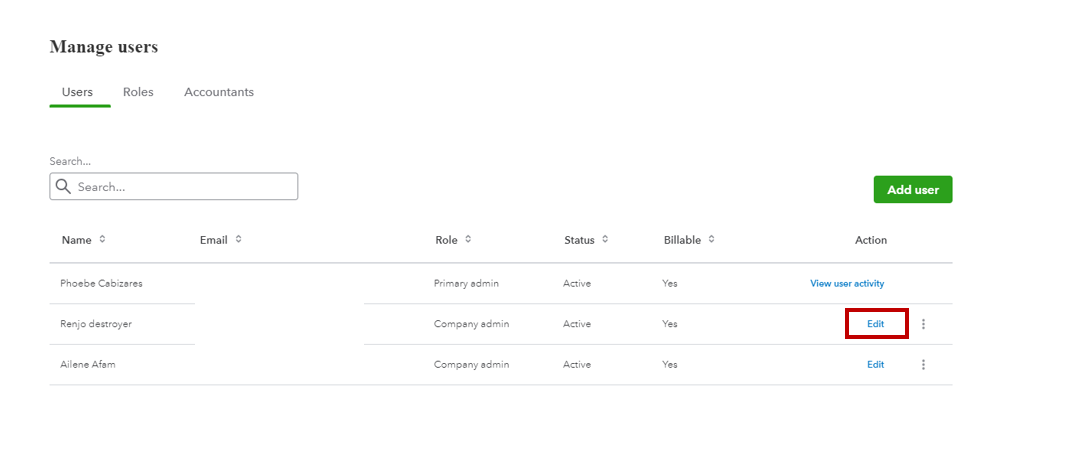
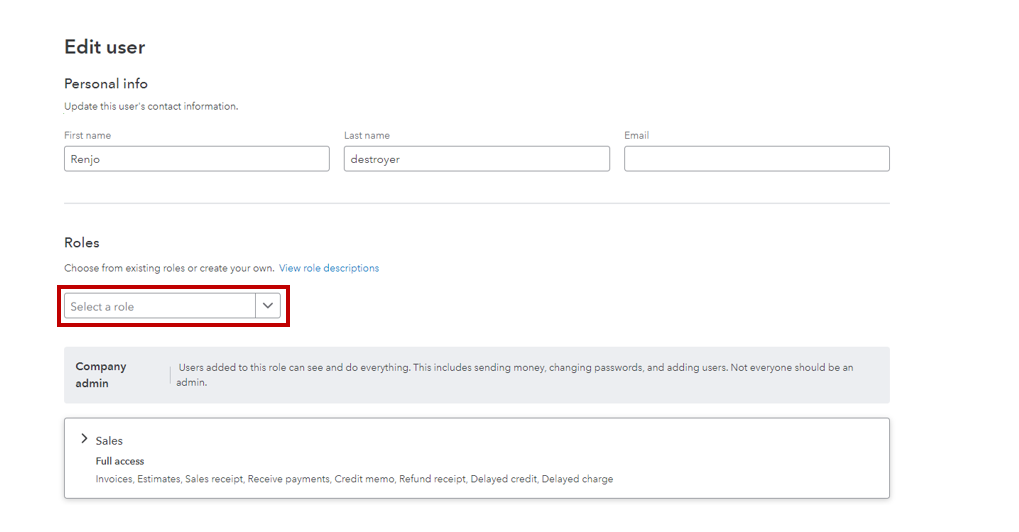
For more details, refer to this article: Change the primary admin user in QuickBooks Online.
Additionally, I've attached some articles you can refer to for your future guidance and detailed steps in managing users:
In case the new primary admin wants to track and check the current company's financials, they can run some reports. We can share this article with them if they need help: Run reports in QuickBooks Online.
Get back to me if you have additional questions. I'll be around to provide the information that you need about changing the primary contact. Have a great day, and stay safe!


You have clicked a link to a site outside of the QuickBooks or ProFile Communities. By clicking "Continue", you will leave the community and be taken to that site instead.
For more information visit our Security Center or to report suspicious websites you can contact us here





