Hello there, @dillontire. Welcome to the Community.
Let's go to Settings or the Gear icon so you can get to display your QuickBooks Online (QBO) account using the Accountant view and manage your data accordingly.
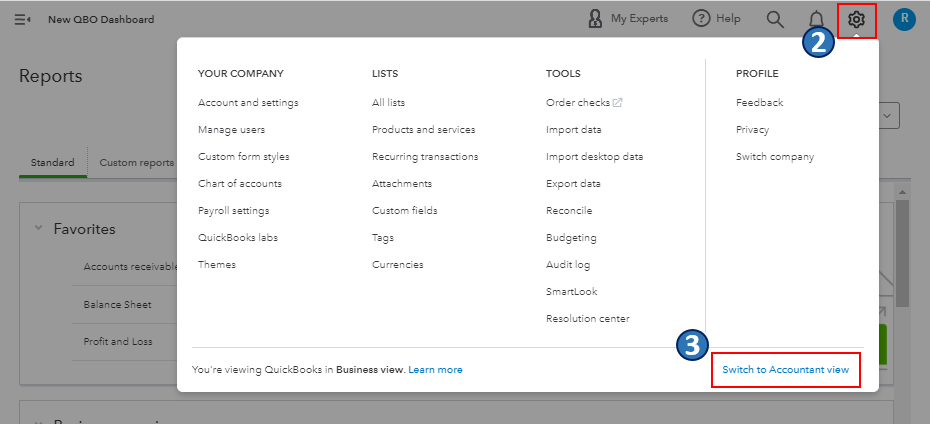
Based on your description, I can tell you want to visit the Reports menu using the Accountant view. If so, you'll first have to switch your view from Business to Accountant via Settings or the Gear icon. Here's how:
- Log in to your QuickBooks Online (QBO) account.
- Select Settings ⚙ or go to the Gear icon.
- Click Switch to Accountant view.
You can read this article to learn more about business and account views and understand their differences in QBO: Switch between Business and Accountant view in QuickBooks Online.
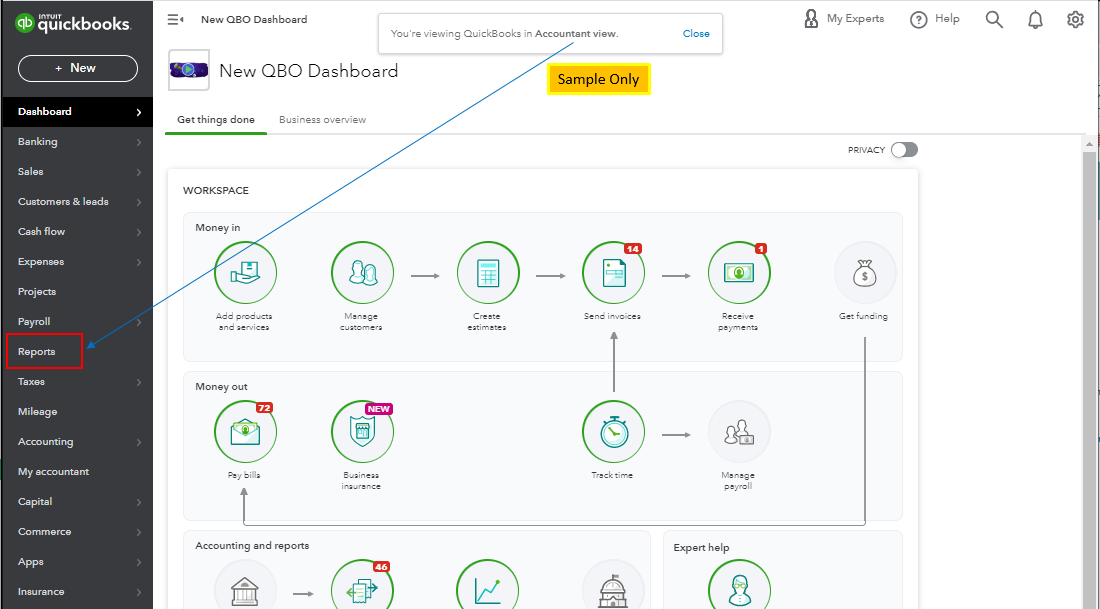
Once you're done, go to the left-hand side of the screen to get to the Reports menu. From there, you can run and customize financial reports to manage the different aspects of your business. Please see the screenshot below for your reference.
Also, you may want to check out one of our Help pages as your reference to guide you in managing your business growth and transactions using QBO: QuickBooks Learn and Support. It includes help articles, Community discussions with other users, and video tutorials, to name a few.
Please feel free to leave a comment below if you have other features or display preferences concerns in QBO. I'm always ready to help. Take care, and have a great day, @dillontire.


