You have the option to either Exclude or Delete duplicate transactions in QuickBooks Online (QBO), Lettie. With this, you don't need to disconnect the bank link to fix it.
Excluding a transaction ensures it won't appear in your bank feeds again. On the other hand, deleting it will cause QBO to mark it as missing. To avoid issues, I recommend excluding the duplicate transaction from your For Review tab.
Here’s how:
- Navigate to the My Apps menu on the left panel.
- Hover over Accounting and click Bank Transactions.
- If the transaction is already categorized, click Undo under the Action column to move it back to the For Review tab.
- Go to the For Review tab, select the transaction, and click the Exclude button.
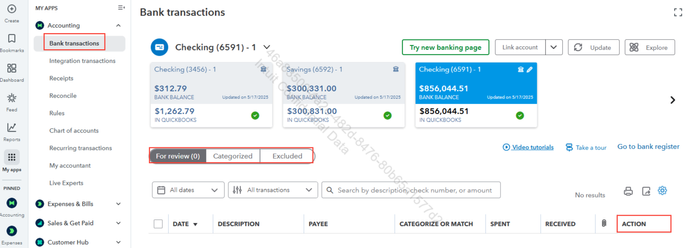
Once excluded, the transaction will be moved to the Excluded tab. If needed, you can restore the transaction by going to the Excluded tab and selecting Undo.
Also, I'd like to provide some resources to help with managing your bank transactions:
Finally, if you'd like to know more about Live Experts, they have you covered, whether you need coaching, tax time support, or someone to manage your books for you. Check this article: Run your business with experts by your side.
We'll be here if you need help aside from removing duplicates from your bank transactions. Just click the Reply button and we'll be there.


