Turn on suggestions
Auto-suggest helps you quickly narrow down your search results by suggesting possible matches as you type.
Showing results for
Get 50% OFF QuickBooks for 3 months*
Buy now
Hello @cafreshroof-gmai,
It looks like you're having trouble with bank transfers in QuickBooks Online, showing a "try again later" message all day. This could be a temporary issue between QuickBooks and your bank's connection. Here are a few things you can try:
If the problem continues, reaching out to QuickBooks Support might be the next step.
Hope this helps!
P.S.: I’m a QuickBooks ProAdvisor with 7+ years of experience. Need help with QuickBooks Bookkeeping?
Google my username, @kabel1657, to see my proven track record!
I appreciate you reporting this to us, cafresh. I understand how essential timely fund transfers are for the smooth operation of your business. Your initiative in seeking help shows your commitment to resolving the issue quickly, and I’m here to assist you every step of the way.
I agree with Kabel that the error could be due to the bank connection. I recommend following the suggestions mentioned above.
With regards to the troubleshooting procedures, open your account and do the bank transfer using an incognito window. This process can eliminate the possibility of a webpage issue.
Here are the following keyboard shortcuts:
Once the bank transfer is successful, return to your regular browser. Then, clear your cache to start afresh. You can also consider switching to other supported browsers installed on your system.
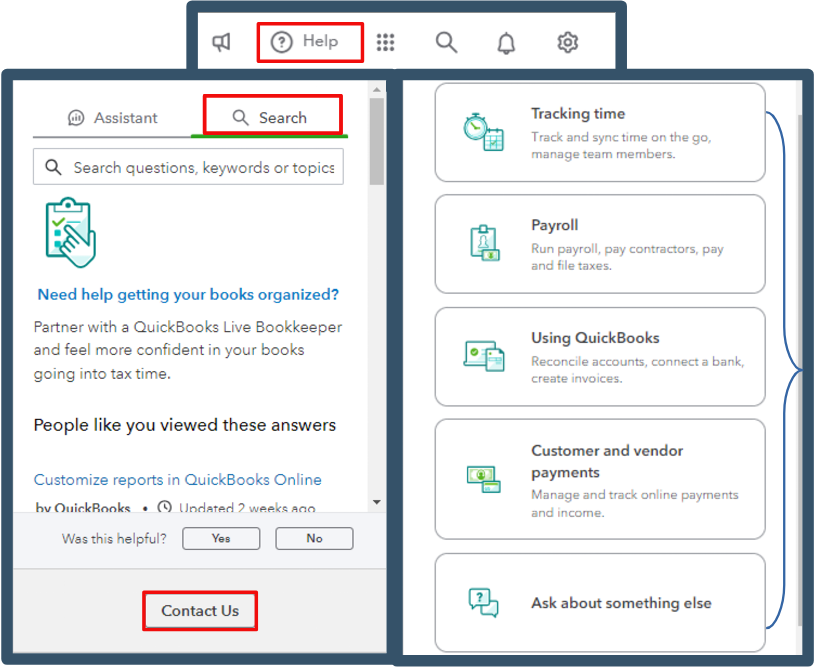
If the issue remains, I suggest contacting our QuickBooks support. Our specialists can pinpoint the cause of your fund transfer issues and the errors you're facing.
Here's how you can reach them:
You might want to check out these resources in the future to help you manage your bank transactions:
I'm committed to supporting you and helping us find the best path forward. Smoothly managing finances is our top priority, and I want to ensure you have all the assistance you need to keep your operations running effectively.


You have clicked a link to a site outside of the QuickBooks or ProFile Communities. By clicking "Continue", you will leave the community and be taken to that site instead.
For more information visit our Security Center or to report suspicious websites you can contact us here


