Turn on suggestions
Auto-suggest helps you quickly narrow down your search results by suggesting possible matches as you type.
Showing results for
Get 50% OFF QuickBooks for 3 months*
Buy now
Hello, jacksontaylorart.
When you import, the file format must be correct for you to successfully bring these transactions into your company. QuickBooks Self-Employed requires three or four columns.
Also, to avoid errors when importing transactions, consider the following reason:
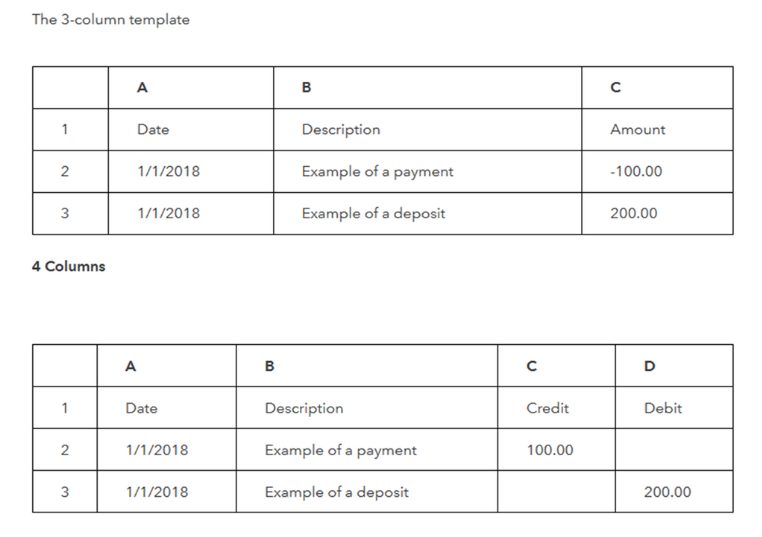
To review your CSV file format, you can visit this article for the steps on how to do so: Format CSV files in Excel to get transactions into QuickBooks.
If the CSV format is mapped correctly, let’s perform the browser troubleshooting steps to resolve the issue. To begin, sign in to QBSE using the incognito mode or private window. This allows you to browse the net without storing internet history and cookies.
Here's how:
From there, import your entries. If this works, clear the cache to improve the overall performance of the browser. This process is just emptying the cache, so the next time you display a webpage, everything must be downloaded anew.
On the other hand, you can re-import your data manually into your company. Check out this guide for more information: Manually import transactions into QuickBooks Self-Employed.
Get back to me if you have any other questions by leaving a comment below. I'm a few clicks away to help. Have a good day!


You have clicked a link to a site outside of the QuickBooks or ProFile Communities. By clicking "Continue", you will leave the community and be taken to that site instead.
For more information visit our Security Center or to report suspicious websites you can contact us here


