Turn on suggestions
Auto-suggest helps you quickly narrow down your search results by suggesting possible matches as you type.
Showing results for
Get 50% OFF QuickBooks for 3 months*
Buy nowFIRST I want to say I understand how undeposited funds work so please do not explain it to me.
I just took on a client and he has undeposited funds from 2016-2020 and I need to clean it up. He didn't understand how it worked. I am currently working on his 2021 books because he is way behind BUT he has filed his taxes for 2020 so I don't want to touch anything prior to 1/1/21.
Please answer if you know how to clean this up.
Thank you!
Dina

Thanks for posting here, @Dina H1967. I can surely help you out.
You'll need to deposit the payment to the bank so it will go directly to the bank register.
Thereby, you have to create a bank deposit and combine multiple transactions into a single record so QuickBooks matches your real-life bank.
Here's how:
1. Go to +New and select Bank deposit.
2. From the Account dropdown, choose the account you want to put the money into.
3. Select the payments included in the deposit by checking the box.
4. Make sure the total of the selected transactions matches your deposit slip
5. Click Save and Close.
You can also change the Deposit to field manually from Undeposited Funds to any bank account.
Here's how:
1. Go to Sales and select Customers.
2. Click the customer's name and look for the payment.
3. In the Receive Payment page, change the account from the Deposit to dropdown list to any bank account.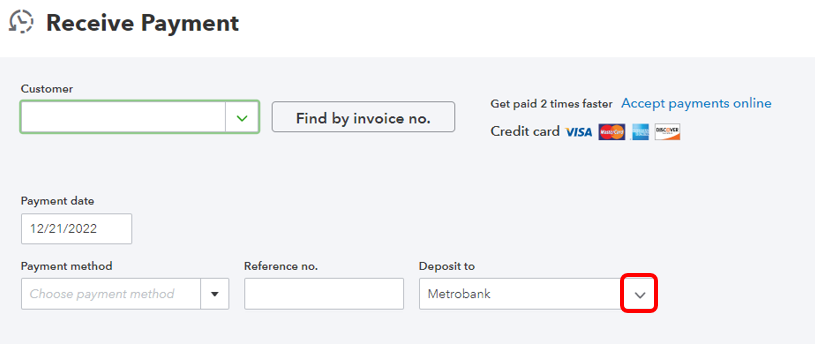
4. Click Save and close.
To learn how to put transactions in the correct accounts, check out this article: Categorize and match online bank transactions in QuickBooks Online.
You can always get back to me if you have any other questions about undeposited funds. I'd be glad to help. Take care and have a nice day!
Presumably, your client actually deposited the funds into their bank account but did not record the deposits in QB, yes? Did your client record the actual deposits some other way in QB? If they created duplicate deposits in QB for these undeposited amounts, then you will need to reverse those entries. More info would help.
If they did not duplicate the deposits, I think your only option is to deposit them in 2021 and then figure it out when you reconcile the 2021 bank statements.


You have clicked a link to a site outside of the QuickBooks or ProFile Communities. By clicking "Continue", you will leave the community and be taken to that site instead.
For more information visit our Security Center or to report suspicious websites you can contact us here


