It's good to see you in the Community, ASwannSkincare!
To reconcile your transactions in 2020, you need to add an opening balance and date it as the oldest because this is the initial transaction. You don’t have to add one if you already have it. Usually, this is a bank deposit for checking and savings accounts or the first expense transaction for credit card accounts.
- Go to Accounting and select Chart of accounts.
- Find the account and select View register from the Action column.
- Sort the transactions from oldest to newest by clicking on the DATE column name.
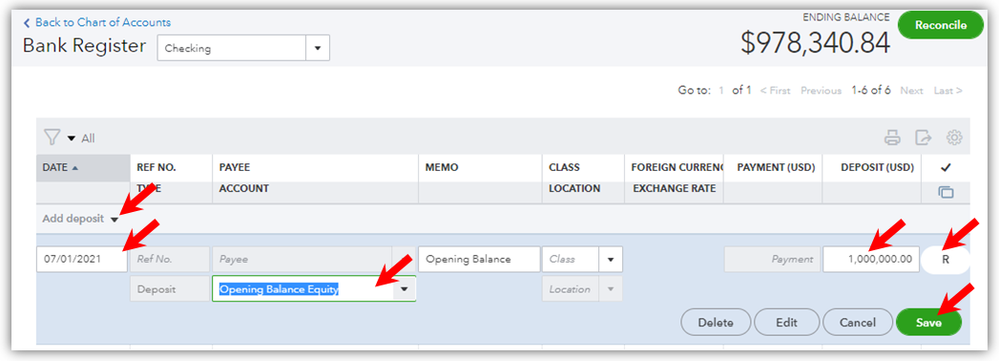
- Click the down arrow and select what transaction was it. Eg. deposit.
- Enter the date, choose Opening Balance Equity in the Account field, enter a memo, the amount, and click the next field to show the R mark, like in the screenshot.
- Click Save, read the popup message and choose Yes to confirm.
After entering the opening balance, reconcile the first month, second month, and so on.
Please note that the running balance after the last transaction in 2020 is your opening balance for the first reconciliation in 2021. Therefore, if you put an opening balance when you reconciled for January 2021, delete it. There should be no other transactions, such as a temporary opening balance or an adjustment entry between the last transaction in 2020 and the first transaction in 2021.
If you have other any other questions in mind, feel free to go back to this thread. Take care and have a good one!


