Yes, you can pay your employees occasionally by using an unscheduled payroll in QuickBooks Online (QBO), pse2.
In QuickBooks Online, all regular employees need to have a specified pay frequency (weekly, biweekly, monthly, etc.) to ensure compliance with payroll tax laws.
In your case, you can pay them outside of their regular pay schedule by following the steps below:
- Go to the Payroll menu and select Employees.
- Click Run Payroll.
- Select a pay schedule and hit Continue.
- Choose employees to pay and select the Pay period and Pay date.
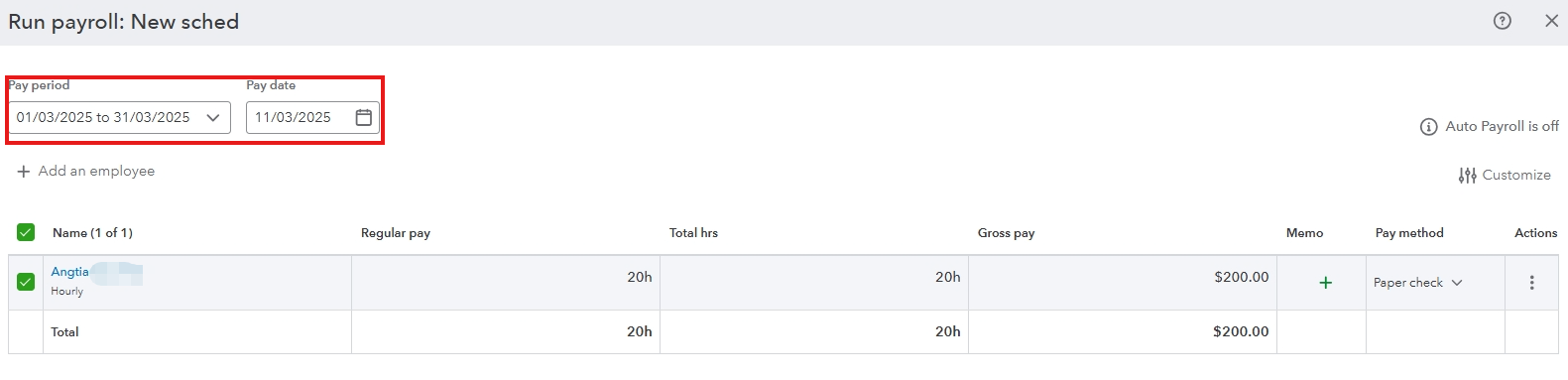
- Enter their hours or amounts manually for this specific payroll.
This keeps employees tied to a regular pay schedule for tax compliance while enabling you to pay them occasionally.
However, if you’re dealing with workers who are paid irregularly, like for occasional freelance work or specific projects, you may want to classify them as independent contractors instead of employees. Contractors are paid without a pay schedule, and QuickBooks allows you to issue payments to them as needed.
Here's how you can set them up:
- Go to the Expenses menu and select Contractors.
- Click Add a contractor.
- Enter your contractor’s information, or select the Email this contractor to complete their profile checkbox.
Then, you can refer to this article on how to pay them: Pay a contractor with direct deposit.
Please leave a reply below if you have more questions or QuickBooks concerns. The Community team is always available to help.


