Turn on suggestions
Auto-suggest helps you quickly narrow down your search results by suggesting possible matches as you type.
Showing results for
Get 50% OFF QuickBooks for 3 months*
Buy now
The tax tracking type determines how the payroll item appears on tax forms, Kfcoffice.
Having said that, once a payroll item is correctly set up, the amounts will post in the accurate box. To know the items/amounts that will be reported in Box 14: Other, I'll share the article about W2 form boxes explained.
You can review your payroll settings to ensure the amount will be posted in W-2 Box 14. Here's how:
Once you're ready, you can file the W-2 form.
Keep in touch if you have more payroll questions. We're here to fill you in.
Then where?
It looks like this is a duplicate post, @Darrel Mollenhour.
Let me link you to the original thread where my colleague @Glinette responded to your question.
I'm just a post away if you should have any questions. Have a lovely day.
Can you help me post an amount in box 14 of the W-2?
Hello there, @Raleigh Skin Surgery.
As mentioned by my colleague Kristine Mae, the tax tracking type determines how the payroll item appears on tax forms.
If the employee is subject to withholding for state disability insurance (SDI) or state unemployment insurance (SUI), QuickBooks automatically enters the amount withheld in this box.
You can check this article for more details about W2 form boxes: W2 form boxes are explained.
Please let me know if you have followed up questions. I'm always here to help.
Where do you go after Payroll Settings?
Thanks for getting back to us here, @kfcoffice.
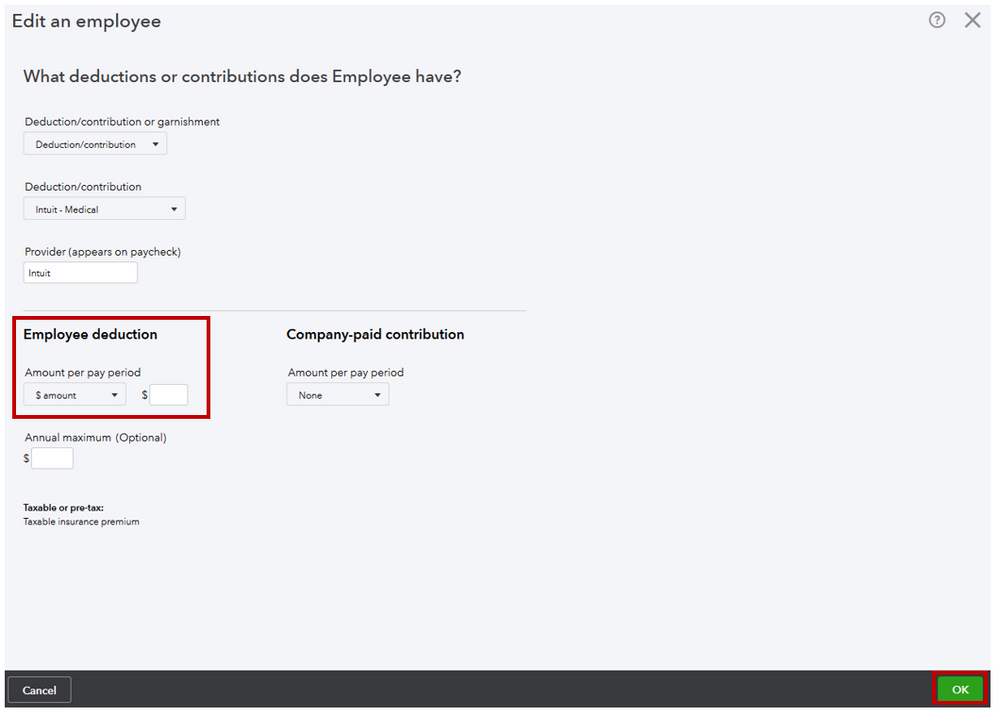
I'll make sure you'll get your W2 box 14 reported. Once you've verified the deduction item from the payroll settings, you'll want to edit your employee's profile to add the item. This way, your W2 information is accurate.
To edit the employee's profile:
With the above steps, you're able to report the amounts for your box 14 in your W2. However, if you're trying to correct the previous paycheck you'll need to create a payroll adjustment. Thus, payroll adjustment must be done via our Payroll Support. Just go to Help, Contact Us, and follow the steps to connect to our chat representatives.
Learn more about the set up and payroll through these guides:
Also, here's a link that covers all tasks you can do when using the payroll feature: Commonly used articles to get started with Payroll.
Let me know if you still have questions or concerns with payroll. I'll be around to help. Take care and stay safe.
I clicked on the link for the answer from @Glinette but I wasn't able to access the information.
Hey there, @kfinebooks.
Thanks for joining in on this thread.
As I was looking at this post and other threads you've been on, I don't see a Glinette individual giving you information in the Community. However, I can still help you get your questions answered.
To dig deeper into your problem, what information were you trying to look into? I'll be able to give you the best solution after I gather more details from you.
I'll be waiting for your response!
Good afternoon - I am trying to report personal auto use on a W2 box 14, but none of the above suggestions is working to get the information into the box. I tried entering the pay type "Personal Use of Company Car" but that didn't seem to work either. Any suggestions?
Good morning jenny-garrity,
Thanks for connecting with the Community! Since you are still experiencing issues, let's go ahead and contact our Support Team. This way, they can set up a screen share and double-check some settings in a secured environment. Here's how:

The Community has your back, so please let me know if you need any additional assistance. I hope you enjoy your day. Be safe and take care.
I want to add FLSA Overtime Premium to box 14. Can I achieve this with your software? Quickbooks has too much control of my reports. If I am paying for your software, I feel that we should be able to make any/all necessary changes.
Thank You,
Yvette

The new Qualified Overtime Tracking pay type just became available effective 2026. I have enabled that going forward, since it is now required. However, for 2025, I understand it is not required and voluntary to track and that employees can view their 2025 total OT on their pay stubs.
The issue I am having is, because the qualified OT only counts the "Half" portion as tax deductible, and if I have 2 employees that had pay raises during the year, how does the employee know how much of their total OT is the "half" they can deduct?
I have QB online, and there is no feature I am aware of, whether that is in the employee's profile or in reporting, that tracks the effective dates of employee pay rate changes. I wanted to enter this information into Box 14 for them, however I am unable to edit Box 14. I can only edit Box12/13.
Again, I have QB Online and would love to know if this is possible. Currently, I am having to report this information, along with showing them any pre-tax deductions made to supplemental benefits on a separate document to provide them, because again, the W-2 does not break it down, nor am I able to edit the W-2.
Any suggestions?
Thank you
Hi there, @Carissaochoa.
Currently, QuickBooks Online (QBO) Payroll does not have a direct feature that tracks pay rate changes or allows you to view effective dates for those transitions in reporting.
Also, figures in box 14 on W-2's are populated based on specific pay types or deductions configured in your QBO Payroll account. Therefore, manually editing the information in this section is unachievable.
With this, I recommend continuing to maintain these details externally as you're already doing. While this requires manual calculation, you have control over ensuring accuracy and providing your employees with clear documentation.
Check out this article that provides helpful examples and answers some frequently asked questions about qualified overtime in QuickBooks: Impact of the No Tax on Overtime provision to QuickBooks Payroll.
Please leave a comment below if you need further assistance.
Thanks. I can use QBO's calculations and print W-2's using SSA Business Services Online. Please give the following feedback to the appropriate department: "QBO is too restrictive with reports, journal entries, and W-2's. Users should be able to manually make adjustments. Desktop was great for in that aspect, but they convinced us to switch.".
Hello there, @yrbellamy1.
We’re delighted to hear that our colleague’s help provided some useful insights and that you were able to find a solution.
I understand you’d like more flexibility with reports, journal entries, and W-2 adjustments, similar to what you had in Desktop.
While those manual options are currently limited in QBO, I recommend sharing your thoughts with our Product Development team. Your feedback is essential in helping us refine and improve the experience.
Here's how:
We appreciate your feedback and are always here to provide further assistance if needed.


You have clicked a link to a site outside of the QuickBooks or ProFile Communities. By clicking "Continue", you will leave the community and be taken to that site instead.
For more information visit our Security Center or to report suspicious websites you can contact us here