Turn on suggestions
Auto-suggest helps you quickly narrow down your search results by suggesting possible matches as you type.
Showing results for
Get 50% OFF QuickBooks for 3 months*
Buy nowI can't no longer export approved time from quickbooks time to quickbook online to do payroll. Please advise.

Let's figure out the cause of the inability to export approved time from QuickBooks Time to QuickBooks Online and find ways to fix it so you can continue with your payroll management, @Kira_B.
Beforehand, did you receive any error messages when exporting the approved time? These can provide clues on what needs to be fixed.
Before exporting time to QuickBooks Online, make sure the time entries have been approved in QuickBooks Time. Then, head to the top right corner of QuickBooks Time and click QuickBooks. Choose Export All Approved Time.
If you've already done that, let's check the sync log to know what the problem is and to ensure that the employees and their payrolls are correctly mapped. See the sample screenshot below for your visual guide.
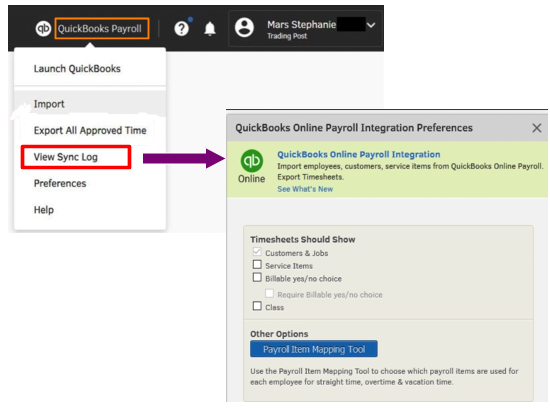
To learn more about sync log errors, check out this article: Fix an error when syncing hours between QuickBooks Time and QuickBooks Online
If everything's fine based on the above reference but the issue persists, let's perform some browser troubleshooting steps. Sometimes browser issues can prevent proper functionality. Let's start by signing into your QuickBooks Time using a private or incognito window. Depending on the browser you're using, you can utilize these keyboard shortcuts to save time:
Once signed in, export all approved time again. If it works using an incognito window, return to your regular browser and clear the cache. Alternatively, you can use another supported browser.
Furthermore, you may also find these resources helpful for monitoring your team's timesheets and generating reports:
We're ready to back you up 24/7 if you encounter any more challenges exporting approved time to QuickBooks Online or have further questions about managing your payroll. Simply leave a reply below and we'll provide the necessary help.
This is the message (image removed)
I appreciate you providing a screenshot of the issue you encountered when exporting your time, Kira_B. I'll share additional troubleshooting and walk you through the detailed process to ensure you can overcome this matter.
To begin with, have you tried manually exporting your time through a private window or a different browser? It helps bypass any corrupted cache files that cause unexpected behaviors and prevent you from completing your tasks accordingly.
Here's how:
If the issue persists, I recommend contacting our customer support team for assistance. With their tools and expertise, they can thoroughly explore the root cause of why you're unable to export approved time to determine the most appropriate fix or alternatives.
Moreover, use this material for guidance whenever you're ready to pay your employees: Create and run your payroll.
Please continue seeking assistance from this forum if you have other concerns about exporting hours from QuickBooks Time to QuickBooks Online. We're here to help address any of your questions as quickly as possible.


You have clicked a link to a site outside of the QuickBooks or ProFile Communities. By clicking "Continue", you will leave the community and be taken to that site instead.
For more information visit our Security Center or to report suspicious websites you can contact us here


