Turn on suggestions
Auto-suggest helps you quickly narrow down your search results by suggesting possible matches as you type.
Showing results for
Get 50% OFF QuickBooks for 3 months*
Buy now
Good to see you here in the Community, @delsol7.
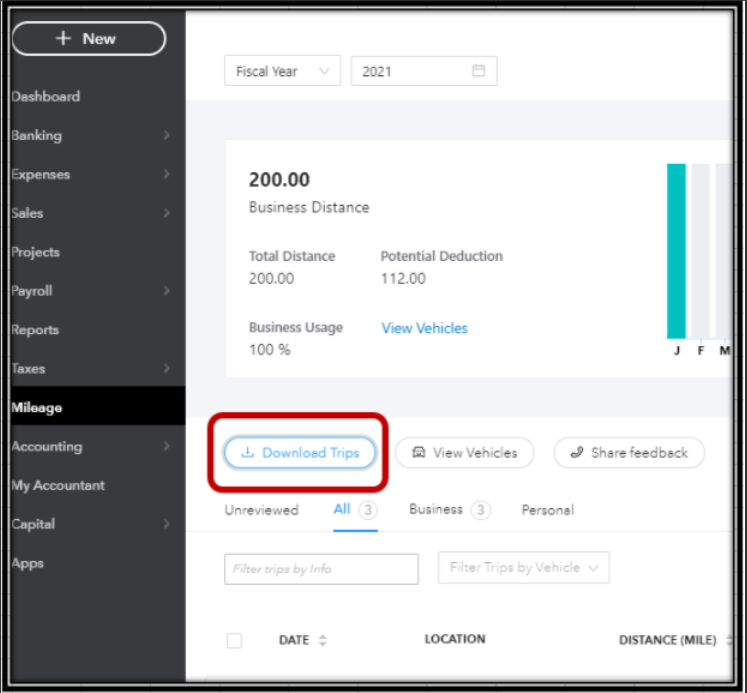
In QuickBooks Online (QBO), we can pull up the mileage report by clicking the Download Trip button from the Trips page. It'll open a report in an Excel file showing all the trips that you've entered.
Just open the trips page and press on Download Trips. Please see the screenshot attached for your reference:
You may also want to check the reports available for your version in QBO.
I've added these articles about maintaining mileage, fixing some issues, and other topics:
Know that you can always get back to me if you need anything else. I'll be around to lend a helping hand. Have a nice day.
Why can’t I export a monthly mileage report on my mobile app like I used to.
Mile logger allows me to from my phone. I don’t need to go to a laptop.
Is the app on my I phone able to produce a monthly mileage report.

Hi there, @RPMNR -Robert.
Let's address your concern about exporting mileage reports in the QuickBooks Mobile app on iOS.
Exporting mileage reports allows you to easily access and utilize detailed information about your vehicle usage. The exporting option on your mobile device is functioning well in iOS.
I recommend keeping your app updated for the latest features and fixes to help eliminate common issues. To start, clear the app data to refresh it and enhance performance. Please ensure you’re connected to the internet and follow the steps below:
If the issue persists, let's proceed with uninstalling and reinstalling your account for a fresh start. I also have this article to guide you through reinstalling the application: Install QuickBooks Online on iPhone.
Additionally, I’ve included an article that offers an overview of the app's capabilities, which will help you explore the software effortlessly: QuickBooks Online app overview.
If you need any further assistance in exporting or managing data, feel free to leave a comment in this thread, @RPMNR -Robert. You can count on me to provide reliable and helpful support. Take care!


You have clicked a link to a site outside of the QuickBooks or ProFile Communities. By clicking "Continue", you will leave the community and be taken to that site instead.
For more information visit our Security Center or to report suspicious websites you can contact us here


