Turn on suggestions
Auto-suggest helps you quickly narrow down your search results by suggesting possible matches as you type.
Showing results for
Get 50% OFF QuickBooks for 3 months*
Buy nowSo when I first started at the business and had not had much experience with QuickBooks or Payroll, I paid an owner through payroll rather than draw. Now taxes are due on the payment and I know that since we are a partnership LLC the owner should not be included in the quarterly wages due to our state unemployment insurance. I believe we also already paid other payroll taxes on the payment as well. How would I go about resolving this issue?

Hi @Ernest9,
Let me share some information about paying an owner. If you're a sole proprietor, you must be paid with an owner's draw instead of a paycheck through payroll. In your case, you can delete the paychecks to remove the owner from payroll. Let me guide you how.
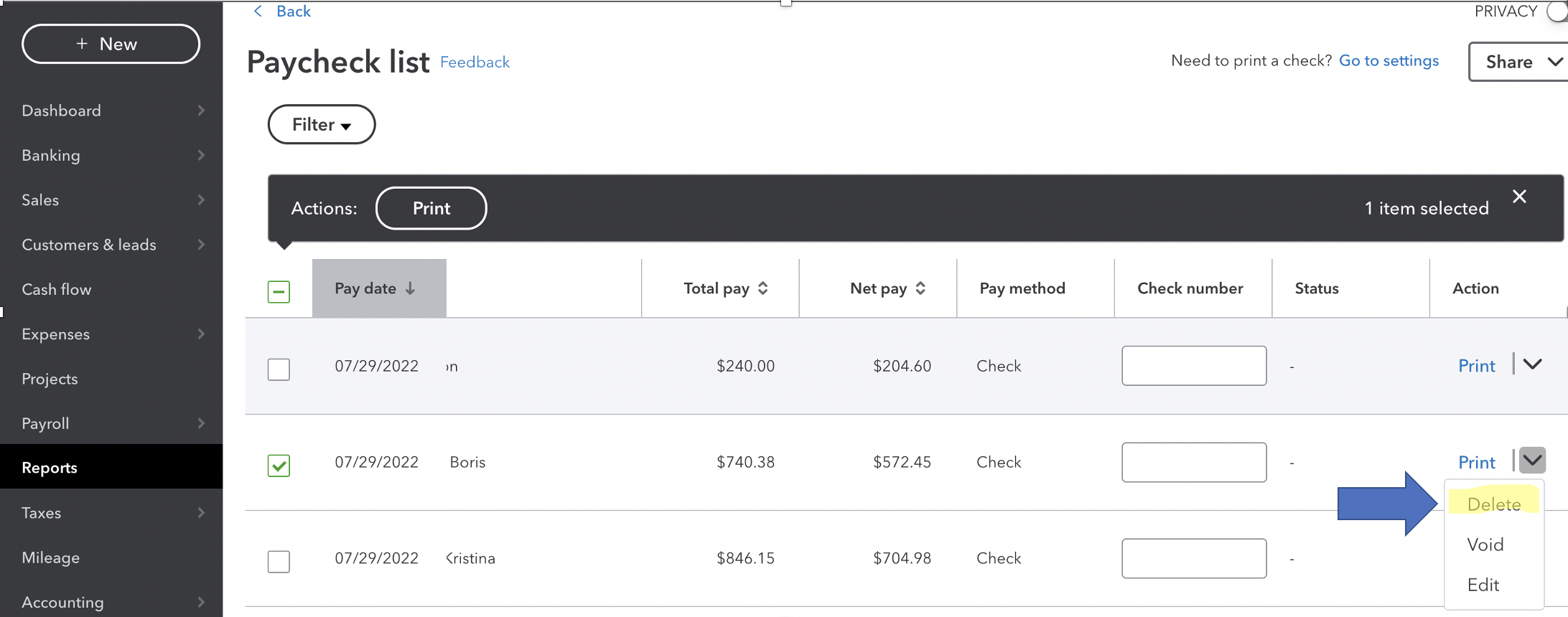
Then, make employee account of the owner inactive. See this article to know how: Add, edit, or inactivate an employee
After that, write a paycheck to the owner from the owner's draw account. Learn more about it through this guide: Set up and pay an owner's draw.
Additionally, here's a link that'll help you manage other accounting-related activities. It has topics with steps and videos. Just choose a topic that fits your concern: Advanced Accounting.
Reach out to me again if you need help with owner's draw. I'll be right here for you. Take care and have a good one.
Just want to update the thread that I did try to delete the paycheck mentioned. QuickBooks didn't allow me to outright delete it so then I had my issue automatically escalated to support & resolved that way. It required editing the paycheck through an excel form that I was sent, filled out, and sent back. The support agent then escalated the issue further to the operations team.


You have clicked a link to a site outside of the QuickBooks or ProFile Communities. By clicking "Continue", you will leave the community and be taken to that site instead.
For more information visit our Security Center or to report suspicious websites you can contact us here


