Turn on suggestions
Auto-suggest helps you quickly narrow down your search results by suggesting possible matches as you type.
Showing results for
Get 50% OFF QuickBooks for 3 months*
Buy now
Hi there, @nationalfitnesso. I've got you the steps on how to enter previous payroll.
If there are no paychecks created yet, here's how to edit prior payrolls:
You can also refer to this guide for more details: Set up a prior payroll for QuickBooks Online Payroll.
Otherwise, you'll have to contact our Payroll Support Team. They'll access your account and create an adjustment to record the old payroll transactions prior to using QuickBooks.
Here's how to reach out to them:
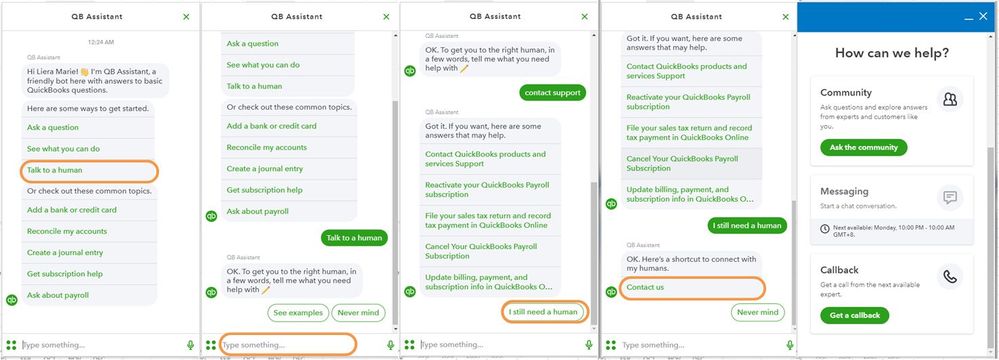
For more details about our support availability, refer to this article: Contact Support.
Let us know if you need any further assistance in running your payroll. The Community is always here to help.
Hope you’re doing great. I wanted to see how everything is going about entering prior payroll. Was it successful? Do you need any additional help or clarification? If you do, just let me know. I’d be happy to help you at any time.
Looking forward to your reply. Have a pleasant day ahead!
I could not find the option "Enter [current year] prior pay details.". How can I find it? Do I need to reset payroll?
Let me provide some information about entering the previous payroll in QuickBooks Online (QBO), Tfp1201-.
The Enter [current year] prior pay details option is only available when there are no paychecks created yet in QBO. We can find it go back to Payroll and select Finish adding your team. Then, select the employee and scroll down to see the Enter [current year] prior pay details option. Here's an article you can refer to for more details about setting up a prior payroll for QuickBooks Online Payroll.
If that option is unavailable, there's no need to reset your payroll. What we can do is to contact our Payroll Support Team. They'll access your account and create an adjustment to record the old payroll transactions before using QBO. To ensure we address your concern, our representatives are available from 6:00 AM to 6:00 PM on weekdays and 6:00 AM - 3:00 PM on Saturdays, PST. See our support hours and types for more details about this one. Here's how:
I've also added an article you can refer to for more details about creating paychecks in online payroll.
Feel free to browse this link here if you need help with other tasks in QuickBooks Online Payroll. It'll route you to our general payroll topics with articles.
Drop a comment below if you have follow-up questions or concerns about processing payroll forms. I'm more than happy to assist you. Take care and have a wonderful day ahead.


You have clicked a link to a site outside of the QuickBooks or ProFile Communities. By clicking "Continue", you will leave the community and be taken to that site instead.
For more information visit our Security Center or to report suspicious websites you can contact us here


