Turn on suggestions
Auto-suggest helps you quickly narrow down your search results by suggesting possible matches as you type.
Showing results for
Get 50% OFF QuickBooks for 3 months*
Buy nowIn checking payroll numbers for Form 941 for the 3rd quarter 2025 I found an error on line 2 of the 941, QuickBooks is adding pre-tax cafeteria plan health insurance (Premium Only Sec 125 plan) reimbursements to taxable wages. I have been using QuickBooks for payroll for 25 years and this is the first time I've had this problem. Is anyone else having this problem?

Trixie
I just wrote a detailed reply and it wasn't authenticated so was lost. Short answer:
I'm setup correctly, the program is updated and I updated from Accountant's Version 2023 to Enterprise Accountant 24.0.
Quarter 2 was fine so there must be a flaw in one of your payroll updates since 2nd quarter filing.
Social Security and Medicare wages are correct. Line 2 wages subject to withholding is not.
I really am very experienced and have checked every scenario where I could have made a mistake but we've been using this payroll item for many years and this is the first time I've had this problem
Donna R
I completely understand your position, and it’s clear from your detailed review and extensive experience that you’ve thoroughly explored every possible cause on your end, yet you still encounter this issue, @donna15680. Given the circumstances, I recommend reaching out to our Live Support Team, as they have the specialized tools and resources to provide you with the best possible solution.
To connect with our support, you can follow these steps:
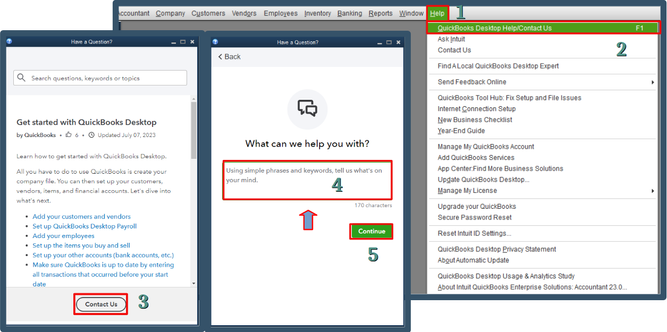
Please be aware of the support availability hours to ensure you can reach out at the appropriate time. For QuickBooks Desktop Pro, Plus, Premier and Mac versions, support is available Monday through Friday from 6 AM to 6 PM Pacific Time, and is closed on Saturdays and Sundays. For QuickBooks Desktop Enterprise, support hours are Monday through Friday from 5 AM to 7 PM Pacific Time, and on Saturdays and Sundays from 6 AM to 3 PM Pacific Time.
We know payroll matters can be challenging, especially when unexpected issues arise. Please remember that our support team is available to help you during these hours and is dedicated to getting you back on track as quickly as possible. If you have any questions or need additional assistance before contacting them, I’m here to help.
Problem solved:
After speaking to the support person yesterday, I gave the problem more thought.
We have a fairly complicated payroll structure including Employer provided health coverage which includes (1) a deduction for employee paid dependent coverage which is setup as a Premium only/125 deduction payroll item.
We also have (2) a Health Reimbursement Arrangement (HRA) payroll item for pre-tax reimbursement to staff for self-obtained health insurance coverage or Medicare premiums and supplement coverage. I also set this item up as a Premium only/125.
It occurred to me that the 941 was treating #1 correctly but not #2 which was an addition to net pay. I changed #2 to "Other" for tax tracking purposes. This corrected the problem with line 2 wages on the 941 Form.
Good afternoon, @donna15680.
Thanks for coming back and letting us know what helped resolve your problem.
We are glad that you were able to get this taken care of and it was an easy fix.
If you have any other questions, feel free to ask. Have a great day!


You have clicked a link to a site outside of the QuickBooks or ProFile Communities. By clicking "Continue", you will leave the community and be taken to that site instead.
For more information visit our Security Center or to report suspicious websites you can contact us here


