Turn on suggestions
Auto-suggest helps you quickly narrow down your search results by suggesting possible matches as you type.
Showing results for
Get 50% OFF QuickBooks for 3 months*
Buy now

Hi there, dajour.
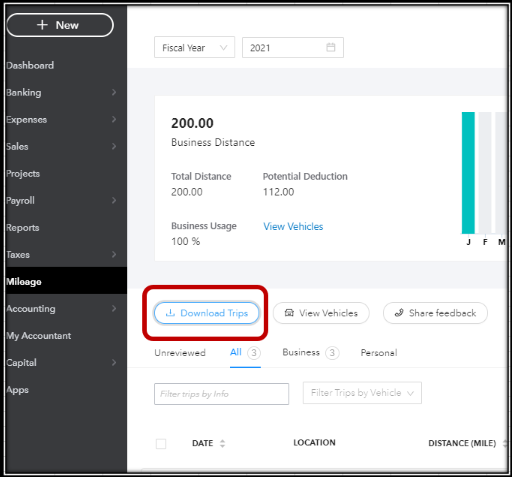
Allow me to help you achieve your goal today. You can download mileage by clicking on the Download Trip button from the Trips page.
A report in an Excel file will open and then shows all the trips you've entered. You can refer to the attached screenshot below:
On the other hand, if you want to view your miles and trips in your financial reports, you'll need to create a posting transaction under mileage.
This kind of transaction will affect report totals, the customer's balance, and the account receivable balance immediately and will reflect whenever you run the financial report.
To give you more insights about the different reports that you can pull up in the system, you can always read through this link: Learn which reports are available for your version of QuickBooks Online.
You can also read through this article if you want to have detailed information about automatically tracking mileage in QuickBooks Online.
If you need additional help with managing your miles and trips transaction, never hesitate to reply to this post. I'll be more than happy to lend a hand. Take care and enjoy the rest of the week!
I don’t have the option to download as you are showing.
Let me assist you in finding the option to download a mileage report after sorting miles in QuickBooks Online (QBO), Kongoffroad.
You can download the mileage report by clicking the Download Trip button on the QBO Trips page. An Excel file will open, displaying the trips you've entered.
Here's how:
However, If you still don't have this option, I'd suggest contacting the Support Team so you'll be included in the affected user's list and will receive updates through email.
Here's how:
Furthermore, you can check out this article to learn how to record your business miles and vehicle expenses in QBO so you have everything you need to calculate deductions at tax time: Automatically track mileage in QuickBooks Online.
Feel free to click reply below if you have other mileage or QuickBooks-related concerns. We're always here to help.


You have clicked a link to a site outside of the QuickBooks or ProFile Communities. By clicking "Continue", you will leave the community and be taken to that site instead.
For more information visit our Security Center or to report suspicious websites you can contact us here


