I can provide here a fix to ensure Simple IRA contribution calculation will be accurate, @shopaars.
There might be data issues on your end that lead the program to behave unexpectedly. The QuickBooks verify and rebuild tools will find the most common data concerns in a company file and fixes them right away.
You can follow the steps outlined below:
1. First, choose Window and then select Close All.
2. Go to the File menu, and then click on the option of Utilities.
3. Select the option of Rebuild Data.
4. Follow the onscreen instruction to back up your data.
5. When the tool finishes, select OK.
6. Navigate to the File menu, then hover over Utilities.
7. Click Verify Data and select Rebuild Now once QuickBooks finds an issue with your company file.
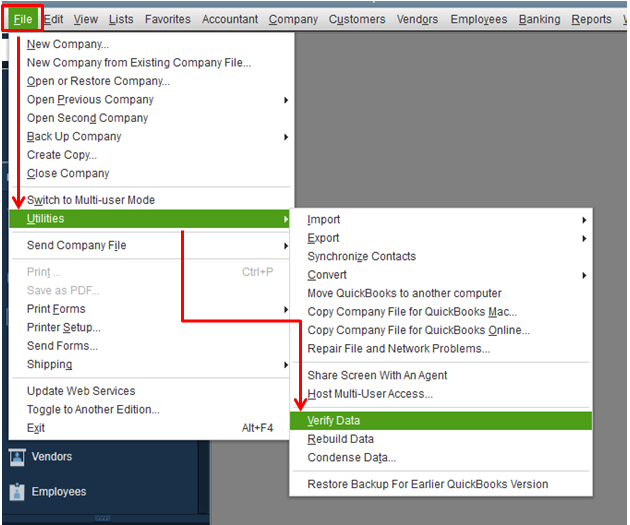
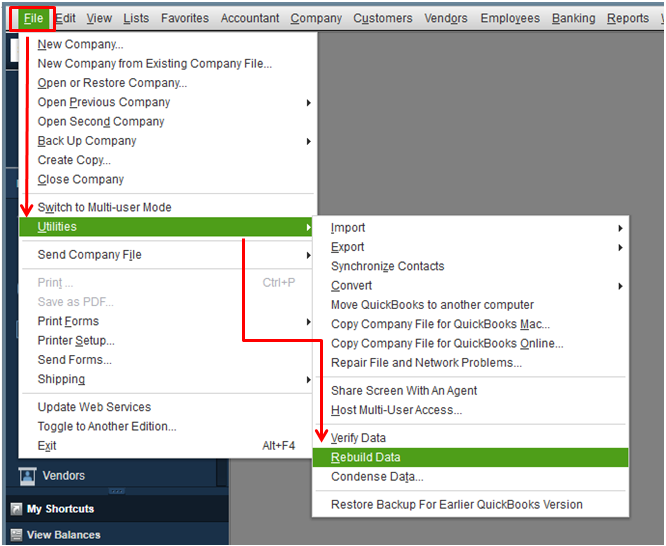
Please know that you'll need to log in to your Desktop account using the single-user mode when performing this process. Also, ensure that you have the newest payroll tax table. This way, you'll always have the latest payroll updates.
I've added this link about operating the SIMPLE IRA Plan that I'm sure you'll find helpful: Operating a SIMPLE IRA Plan.
Feel free to come back here again if you have other concerns about contribution to QBDT. I'm always available here to help. Have a good one.


