Turn on suggestions
Auto-suggest helps you quickly narrow down your search results by suggesting possible matches as you type.
Showing results for
Get 50% OFF QuickBooks for 3 months*
Buy now
Let's get this resolved, pawpawsdog. I'd be delighted to share some troubleshooting steps to fix the issue with setting up a state withholding ID number for your QuickBooks Online (QBO) account.
Beforehand, may I know what state you are trying to set up a withholding ID number? Have you encountered a specific error message while you're in the setting process?
Nonetheless, I suggest signing in as a company admin and making sure to follow the format depending on your state below the Withholding Number field when setting it up.
If the issue persists, we can try accessing your QBO account through an incognito window. The private window will not save any history, making it a good place to identify browser problems. Here are the shortcut keys:
Once you're in incognito mode, set up your state withholding ID number again using the correct format. If it works, you can return to your regular browser and clear the cache to improve the program's performance. Otherwise, using other supported browsers can be a good alternative too.
I've also added this article to help you identify what specific report you will use to keep track of your books about payroll: Run payroll reports.
If you have further questions or concerns about setting up your payroll preferences in QBO, please don't hesitate to let me know. We are available 24/7 to answer all of them. Have a great day ahead!
I need help I am from Nebraska and I don't have 2 numbers in front of my state id number
Hello, Nichol. I appreciate you reaching out with your concern regarding your state tax ID number. Having accurate information is essential when setting this up within QuickBooks Online.
In your case, I recommend contacting your tax agency to obtain the correct and complete state tax ID number. They can assist you with verifying these details and making any necessary corrections.
Once you have the complete details, here's how to set this up within the platform:
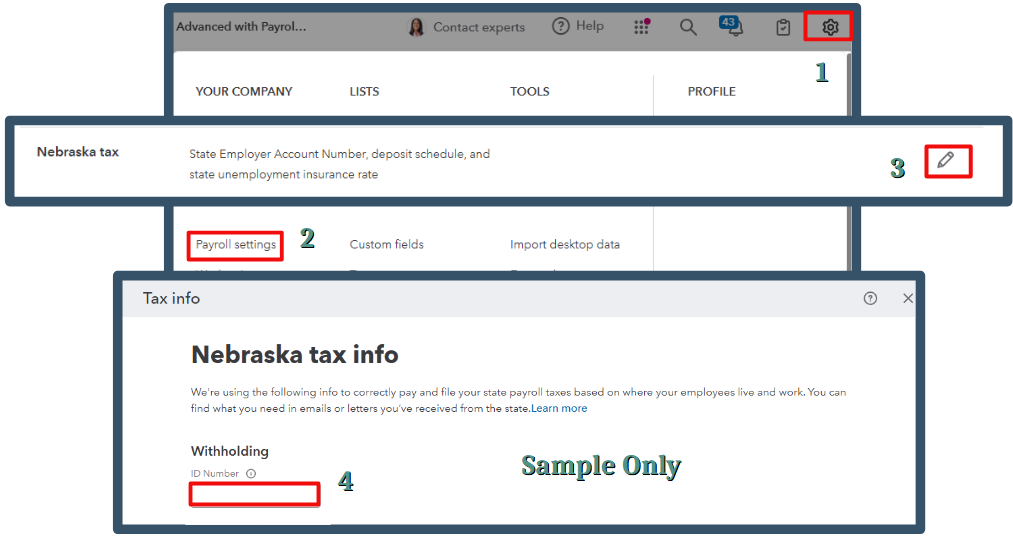
Moreover, you can create a payroll summary report for future reference. It will provide detailed information on your employee's wages, taxes, deductions, and contributions.
We're still here to support you in ensuring your records are accurate within the platform. I appreciate your proactive approach in addressing this matter, Nichol.


You have clicked a link to a site outside of the QuickBooks or ProFile Communities. By clicking "Continue", you will leave the community and be taken to that site instead.
For more information visit our Security Center or to report suspicious websites you can contact us here


