
Get 50% OFF QuickBooks for 3 months*

Buy now
Switch to QuickBooks and 70% off for 3 Months
April 9, 2019
Solved

Backup Withholding

  • April 9, 2019
  • 1 reply
  • 10 views

We have a 1099 contractor that wants to have state backup withholding taxes taken out.  When I set up a other current liability account (like I have for federal backup withholding) and set it up as tax line mapping 1099 - state taxes withheld it is telling me that it is the incorrect account to use with that tax line mapping?   

Best answer by JanyRoseB

Hi there, Allied3.


I'm here to help isolate the error you're getting so you'll be able to process 1099-MISC successfully. 


Before we begin, let's make sure that your QuickBooks Desktop is updated to the latest release.


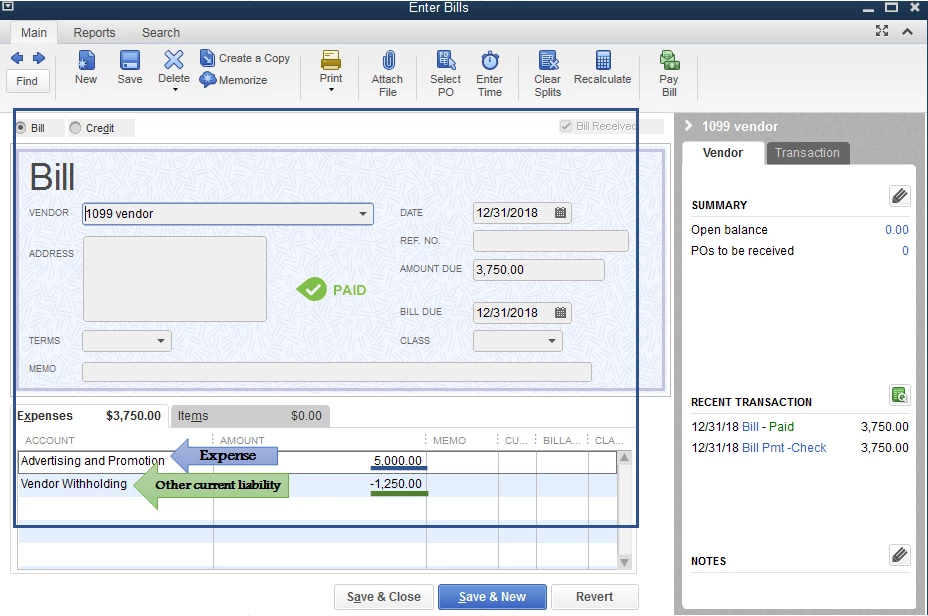
First, you'll need to create a bill or check to record the expense transaction including the vendor withholding with a negative amount (attached screenshot). 
 

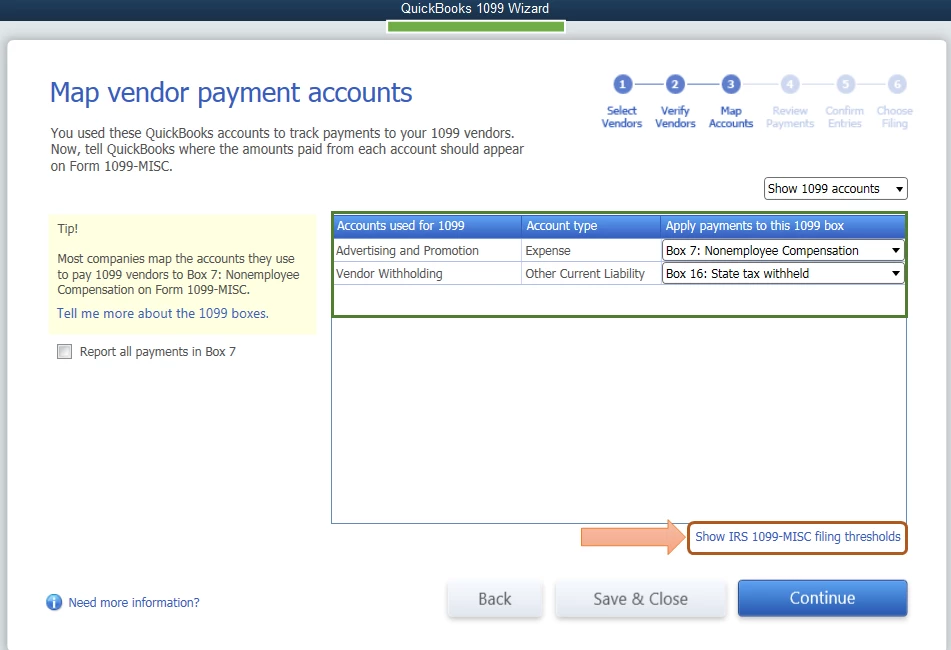
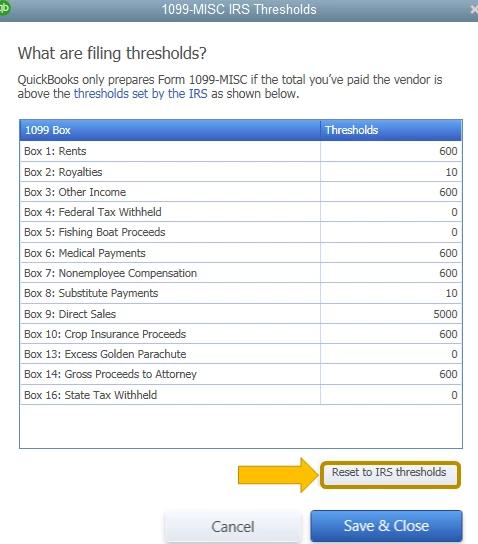
Once done, when mapping an account in the QuickBooks 1099 Wizard window, the expense transaction will show on the Box 7 and the other current liability account will show on the Box 16. Also, to ensure your IRS threshold is updated, you can select the Show IRS 1099-MISC filing thresholds below and click Reset to IRS threshold (attached screenshots).
For additional reference, you can check these articles to learn more about 1099:

This will get you on the right track. Don't hesitate to leave a comment below if you have other questions about the 1099-MISC. I'll be around to help. Have a good one. 

1 reply

JanyRoseBAnswer
Level 5
April 9, 2019

Hi there, Allied3.


I'm here to help isolate the error you're getting so you'll be able to process 1099-MISC successfully. 


Before we begin, let's make sure that your QuickBooks Desktop is updated to the latest release.


First, you'll need to create a bill or check to record the expense transaction including the vendor withholding with a negative amount (attached screenshot). 


Once done, when mapping an account in the QuickBooks 1099 Wizard window, the expense transaction will show on the Box 7 and the other current liability account will show on the Box 16. Also, to ensure your IRS threshold is updated, you can select the Show IRS 1099-MISC filing thresholds below and click Reset to IRS threshold (attached screenshots).

For additional reference, you can check these articles to learn more about 1099:

This will get you on the right track. Don't hesitate to leave a comment below if you have other questions about the 1099-MISC. I'll be around to help. Have a good one. 

Allied3Author
April 9, 2019

This does not answer why I am getting that error and what can be done to correct it.  

Level 5
April 9, 2019

Hi, Allied3.


I already updated my post above with the complete details, please check.