
Get 50% OFF QuickBooks for 3 months*

Buy now
Switch to QuickBooks and 70% off for 3 Months
April 9, 2019
Solved

Backup Withholding

  • April 9, 2019
  • 5 replies
  • 34 views

We have a 1099 contractor that wants to have state backup withholding taxes taken out.  When I set up a other current liability account (like I have for federal backup withholding) and set it up as tax line mapping 1099 - state taxes withheld it is telling me that it is the incorrect account to use with that tax line mapping?   

Best answer by JanyRoseB

Hi there, Allied3.


I'm here to help isolate the error you're getting so you'll be able to process 1099-MISC successfully. 


Before we begin, let's make sure that your QuickBooks Desktop is updated to the latest release.


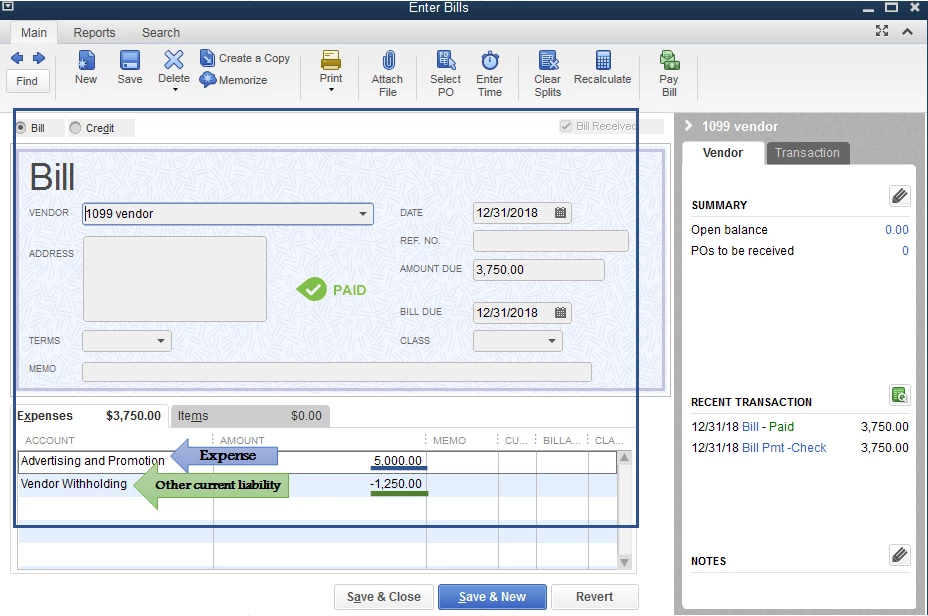
First, you'll need to create a bill or check to record the expense transaction including the vendor withholding with a negative amount (attached screenshot). 
 

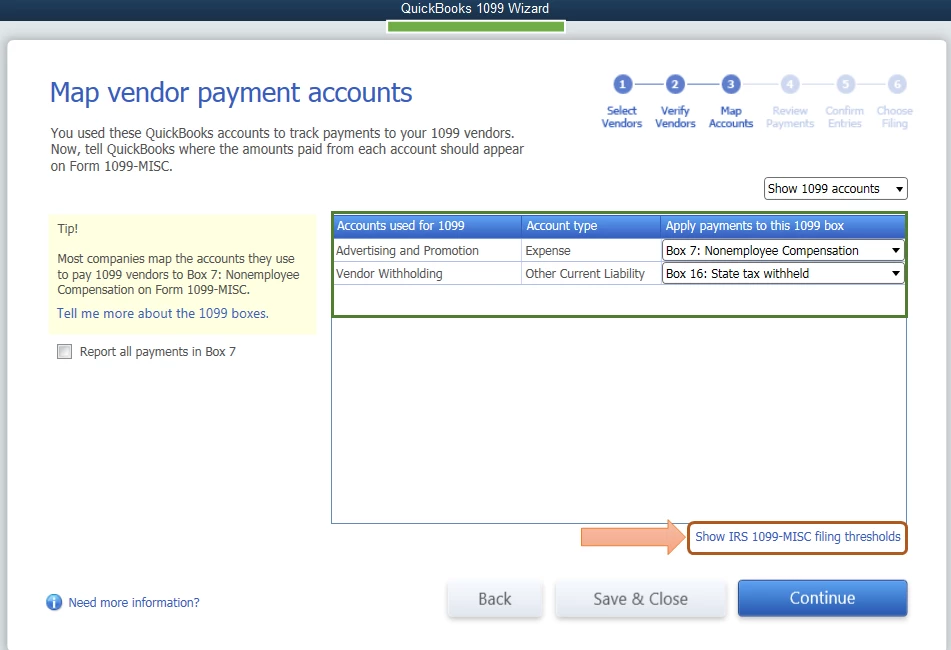
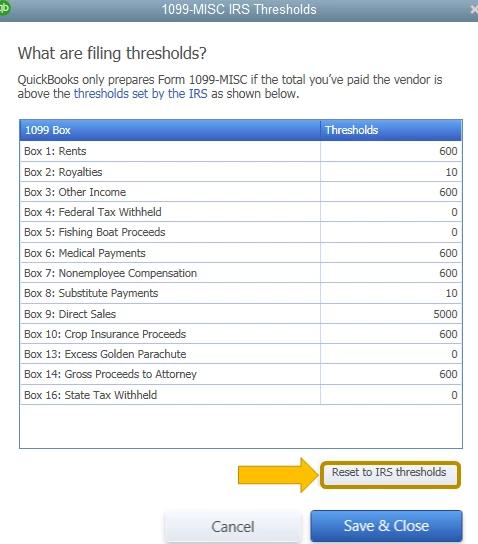
Once done, when mapping an account in the QuickBooks 1099 Wizard window, the expense transaction will show on the Box 7 and the other current liability account will show on the Box 16. Also, to ensure your IRS threshold is updated, you can select the Show IRS 1099-MISC filing thresholds below and click Reset to IRS threshold (attached screenshots).
For additional reference, you can check these articles to learn more about 1099:

This will get you on the right track. Don't hesitate to leave a comment below if you have other questions about the 1099-MISC. I'll be around to help. Have a good one. 

5 replies

JanyRoseBAnswer
Level 5
April 9, 2019

Hi there, Allied3.


I'm here to help isolate the error you're getting so you'll be able to process 1099-MISC successfully. 


Before we begin, let's make sure that your QuickBooks Desktop is updated to the latest release.


First, you'll need to create a bill or check to record the expense transaction including the vendor withholding with a negative amount (attached screenshot). 


Once done, when mapping an account in the QuickBooks 1099 Wizard window, the expense transaction will show on the Box 7 and the other current liability account will show on the Box 16. Also, to ensure your IRS threshold is updated, you can select the Show IRS 1099-MISC filing thresholds below and click Reset to IRS threshold (attached screenshots).

For additional reference, you can check these articles to learn more about 1099:

This will get you on the right track. Don't hesitate to leave a comment below if you have other questions about the 1099-MISC. I'll be around to help. Have a good one. 

January 31, 2023

Hi, I have questions regarding backup withholding:

1. I created an OTHER CURRENT LIABILITY acct called Backup Withholding so that when the contractor's bill is created the tax withheld goes there. After the check is written to the contractor, I need to pay that tax to the IRS.  Once I pay the IRS, that Backup Withholding acct is zeroed out.  Now that it's $0, how does that calculate for the contractor's 1099 at the end of the year?


2.  I entered 1 bill for the contractor & list it as you described to "Allied3" with the full amt in the Contractor's Expense acct (+) & the tax withheld in the Other Current Liability acct (-). Only the expense acct prints on the contractor's check stub. How do I get all accts to show on his stub so he can see what that deduction is?  He's not "payroll", but a vendor.

Thanks!

Level 9
January 31, 2023

Thank you for coming back to the QuickBooks Community, Dee125.


QuickBooks Desktop automatically tracks all contractor-related payments once you already enable the feature for 1099 payments in QBDT. If you haven't performed the procedure, you can follow the steps below:


  1. Select the Edit menu and choose Preferences.
  2. Select the Tax: 1099 menu. Then, select the Company Preferences tab.
  3. Select Yes in the Do you file 1099-MISC forms? section.
  4. When you're done, click OK to save your settings.


Once done, you can open this artilcle to see further steps so you can finish the process: Set up contractors and track them for 1099s.


After that, QuickBooks will start tracking all of their payments behind the scenes. When you're ready to file your 1099s, you can easily add the tracked payments to the form.


On the other hand, please know that when you print a bill in QBDT, all of the entered information including accounts should appear. Since only the expense account appears on the contractor's check stub, there are several possible explanations for this issue. You can view various troubleshooting steps for how to fix them by clicking this article: Fix printing issues in QuickBooks Desktop.


However, if the issue persists, you may open this article to view another instruction on how to resolve unexpected behavior when printing a contractor's entry: Verify and Rebuild Data in QuickBooks Desktop.


Lastly, you can refer to this article for instructions on how to print your 1099 depending on how you processed the form: Print your 1099 and 1096 forms.


Don't hesitate to click the Reply button below if you have other concerns related to 1099 in QBDT. I'm always around to help, Dee125. Have a good one!