Turn on suggestions
Auto-suggest helps you quickly narrow down your search results by suggesting possible matches as you type.
Showing results for
Get 50% OFF QuickBooks for 3 months*
Buy nowI have a client wanting to convert from Sage 50 to QBOnline. The conversion tool that QB has says that you can only use it if the company is accrual basis for accounting. Is this true and if so, what options do they have if they use cash basis accounting?

Hello there, @kiki23. I'll share some insights about converting from Sage 50 to QuickBooks Online (QBO).
Yes, you're right. The conversion tool in QuickBooks Online can only be utilize if your company is in accrual basis for accounting. As a workaround, you can reach out to Sage 50's Customer Care Team. This way, they can help you set up your data to get them easily into QBO.
For more information, please see this article: Convert from Sage 50 to QuickBooks Online.
You can also check for any third-party app available that can help you manage your data to have them in your QuickBooks Online company. I can input the steps below so you can proceed to get one. Here's how:
In addition, here's an article about reconciling an account in QBO: Reconcile an account in QuickBooks Online.
Also, you can visit this page to help you close out the previous year and prepare for the new one: Year-end guide for QuickBooks Online.
Please let me know in the comment section for further details or concerns. I'll make sure to get back to you as soon as possible. Take care!
You can purchase a 3rd party service to convert your data.
Thank you. We will look into this.
We may do this to help eliminate errors. Thanks!
Hi Kurt,
I am planning to convert from Sage 50 to QB online at the non-profit where I work. I would like to go with the Plus version, but I have over 250 chart of accounts. I read that I would then need to use the advanced even if I make the accounts inactive in Sage. I this true? Does Intuit have a migration expert that I should utilize with our inhouse tech admin? I am the bookkeeper not a tech expert.
Thanks,
Jill
It's nice to see you in QuickBooks Community, jillsartstudio. I'll be sharing details on how converting data from Sage 50 to QuickBooks Online works. Let me also ensure you can achieve your goal by performing the information below.
Yes, it's true that you need to use the advanced version of QuickBooks since you have over 250 Charts of accounts. QuickBooks Online Plus will only allow a maximum of 250 accounts. You can open this article to see further details about the usage limits of accounts in QuickBooks: Learn about usage limits in QuickBooks Online.
Additionally, you can visit our QuickBooks pricing page to see different QuickBooks versions from there. Then, select the subscription you want so you can start utilizing the plan.
On the other hand, yes, Intuit has a migration expert that you can utilize. Use the Dataswitcher conversion wizard to move your data from Sage 50 to Online automatically. You can click this article to see extra details and how to perform the process: Convert from Sage 50 to QuickBooks Online.
Lastly, I'm also adding this article if you need guidelines for effectively managing your business using QBO: Help guides for QuickBooks Online. It contains topics about advanced accounting, banking, and payments to name a few.
Don't hesitate to add a comment below if you need more help with migrating from Sage 50 to QuickBooks. I'm always around to help, jillsartstudio.
Another option, buy a 3rd conversion service and you can ask them to ignore inactive accounts in Sage to ensure you can use QBO Plus.
Thanks ChristieAnn,
My director is in the process of getting this approved by the board of directors. I will read all your articles you suggested. We are looking for a QB migration expert that has done Sage to QB. Can QB/Intuit provide someone for this? Also, if I do go with the advanced version, will I then be able to merge unused chart of accounts, lowering the number to less than 250, and then switch to the QB plus version?
Also, we still have Sage purchased checks, can I use these with QB online? They are numbered and on 8.5 x 11 paper that works with our printers.
thank you,
jill
Thanks for getting back to us, Jill. Let me step in and share additional information to address your concerns about migrating from Sage to QuickBooks Online (QBO).
Yes. If you want further assistance migrating your data, you can reach out to our ProAdvisor accountant or a QuickBooks Solution Provider data conversion consultant. They'll be able to help prepare and review your information during the transition and reduce the risk of data error.
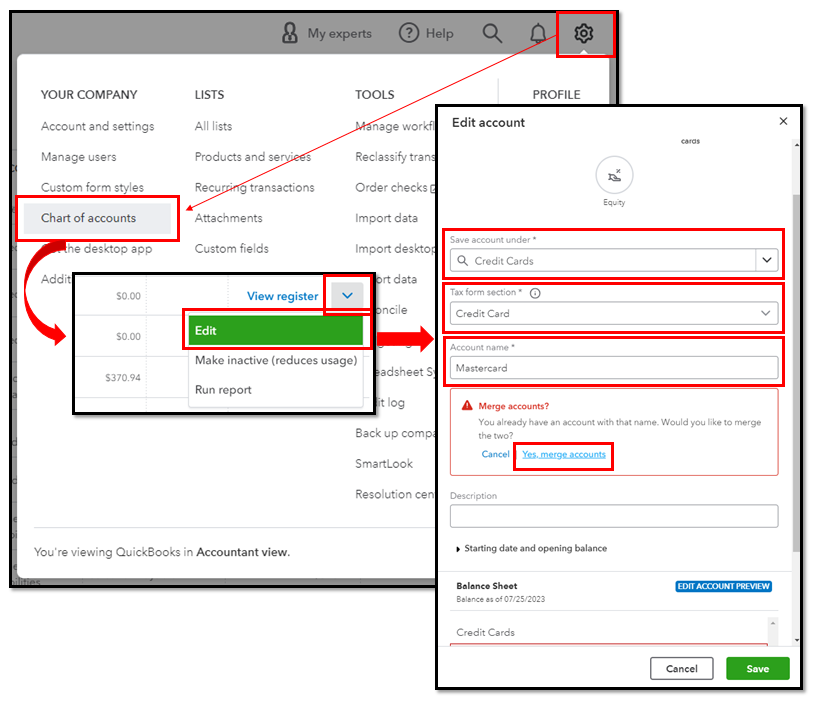
To lower your number of accounts to 250, you may merge them before downgrading to QBO Plus. Doing so transfers all the data into the one you want to retain and makes the other inactivate. To do that:
Additionally, you can print using your own checks, but they still need to be formatted for QuickBooks. To verify, conduct a test print using Sage checks. If they're not aligned, I recommend purchasing compatible ones from Intuit.
We appreciate you for choosing QBO as your accounting software. Here's an article as your guide in setting up your company for success and discovering how to modify our features according to your preferences: Get started and adjust settings after you sign up for QuickBooks Online.
Let me know whenever you need additional assistance with the migration. I'll be always on the lookout for your replies. Stay safe and welcome to QBO, Jill!
We are looking for a QB migration expert that has done Sage to QB
Contact me if private for assistance.


You have clicked a link to a site outside of the QuickBooks or ProFile Communities. By clicking "Continue", you will leave the community and be taken to that site instead.
For more information visit our Security Center or to report suspicious websites you can contact us here





