Turn on suggestions
Auto-suggest helps you quickly narrow down your search results by suggesting possible matches as you type.
Showing results for
I have 3 employees that I would like to ONLY be able to email expense receipts. I do not want them to have any other QB access. Can this be done? Would it count against my user count?

You can use the search bar to find answers to most questions, here in the community. (It's a LOT quicker to search for it yourself, rather than wait for someone to answer). In doing so, I was able to find the link below that will help answer your questions.
Let me share some information about emailing your expense receipts in QuickBooks Online (QBO), ATJTomBlack4.
The option to set up employees as a user to email expense receipts only is unavailable in QBO. What we can do is give standard users permission to forward receipts. Allow me to show you how:
Keeping the following in mind when managing users and addresses:
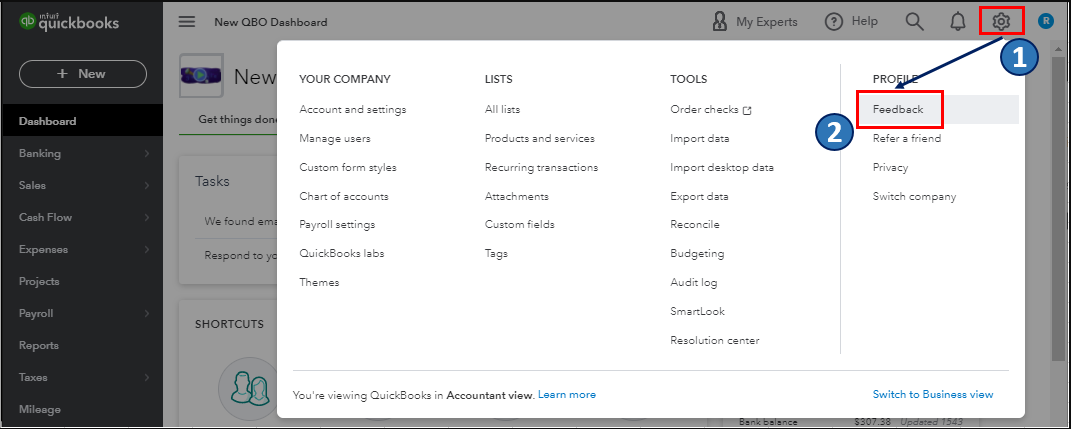
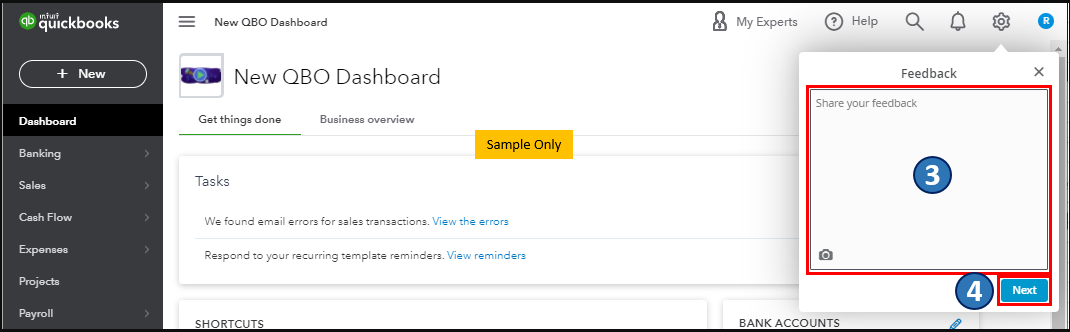
Here's an article you can refer to for more insights about emailing receipts and bills to QuickBooks Online. We view consumer feedback as an opportunity to enhance our products' many features. I'd suggest submitting feedback directly to our engineers. They may look into this suggestion and consider adding this option in future updates. Here's how:
I've attached screenshots below for your reference:
On top of that, you can visit his page to keep updated with the latest software improvements and enhancements with QBO: Customer Feedback for QuickBooks Online.
Feel free to visit our Sales and customers page for more insights about your company's income and customers.
The Community will always have your back if you need a hand with managing your expense receipts and bills. If you have other questions, feel free to add them below.


You have clicked a link to a site outside of the QuickBooks or ProFile Communities. By clicking "Continue", you will leave the community and be taken to that site instead.
For more information visit our Security Center or to report suspicious websites you can contact us here


