Get 50% OFF QuickBooks for 3 months*

Buy now
cancel
Showing results for 
Search instead for 
Did you mean: 
Announcements
peter146
New Member

How do I disable automatic reminders for invoices?

 
2 Comments 2
Erika_K
QuickBooks Team

How do I disable automatic reminders for invoices?

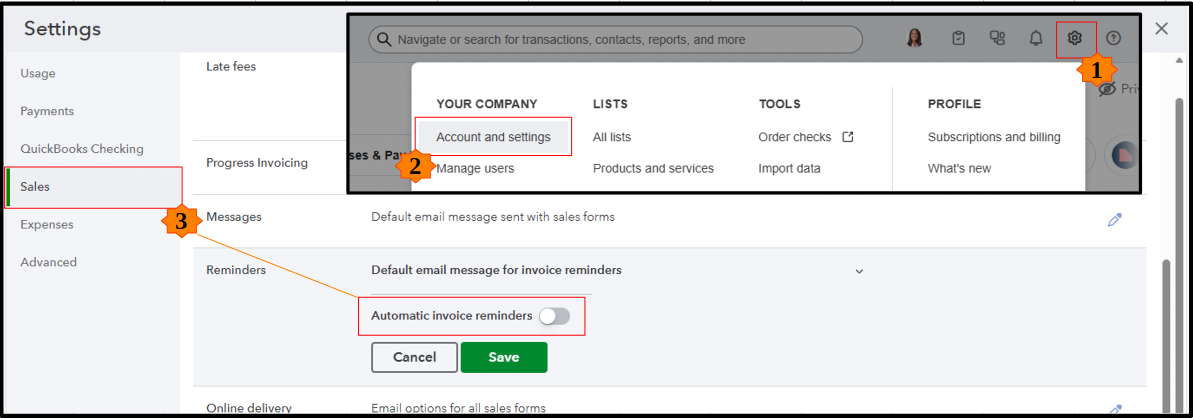
Hi there, @peter146. Just click the Gear icon and go to Account and settings > Sales. Look for the Reminders section and switch off Automatic invoice reminders. Then, click Save, then Done to apply the changes.


I’ve added a visual below to help you spot the right settings.
 

Beyond this, you can also get one-on-one help through QuickBooks Live Expert Assisted. They’ll walk you through your bookkeeping and sales tasks to help you manage your finances with confidence.


If you need a hand with anything else in QuickBooks, leave a comment below.

Erika_K
QuickBooks Team

How do I disable automatic reminders for invoices?

Hello, @peter146I’m following up to see if the solution we provided worked for you.
 
Did it resolve the issue, or are you still experiencing difficulties?
 
We're happy to assist further if you need any more help.

Need QuickBooks guidance?
Log in to access expert advice and community support instantly.

Need to get in touch?

Contact us