Turn on suggestions
Auto-suggest helps you quickly narrow down your search results by suggesting possible matches as you type.
Showing results for
Get 50% OFF QuickBooks for 3 months*
Buy nowThe functionality to access and print out collection letters is only available in QuickBooks Desktop, @apms.
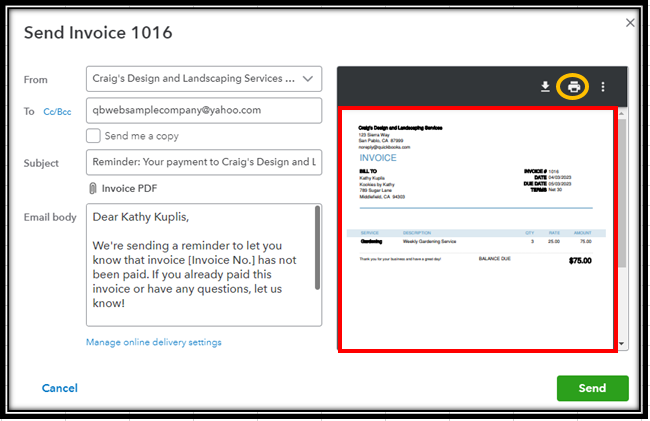
Alternatively, you can use the Send reminder option in QuickBooks Online. You can only print past-due invoices when sending reminders, though. See the image below for reference:
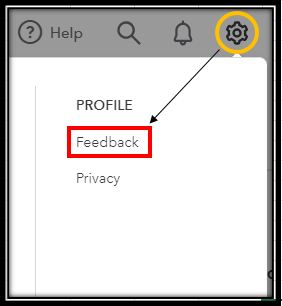
I recommend sending us feedback about this. Your insights will be forwarded to our product developers to consider adding your desired feature in the future. This also helps them improve your QBO experience. Here's how:
Feel free to also browse through our QuickBooks Online Feature Requests webpage for any feature request updates.
Lastly, you can look for a third-party application that you can integrate with QBO that allows you to print out collection letters for clients without email.
Here are extra modules you can read in case you want to bill your customers for products and services you sell to them:
You can always get back to us if you need more help with customers, letters, or QuickBooks. The Community we'll make sure to lend a hand to you and your business. Take care!
So I have to go back to using a discontinued product - that I was told I could no longer use after May 31, 2023 - to print collection letters so I can mail them? How are the new invoices I'm creating in QBO going to show up in the Desktop version? It sounds like I'll have to manually create each letter and copy and paste infromation from QBO to the letter template in my Desktop version. I already spend more time navigating to different screens and menus in QBO to accomplish the same processes than I used to do in less time in Desktop, whcih means I spend MORE time doing the same work. What was the point in upgrading?
Thanks for your follow-up, @apms. Allow me to elaborate or clarify things so you can get back to working order.
Please know that if you're using a QuickBooks Desktop (QBDT) version with one time license, then you can still use that. However, if it's a QBDT subscription then you can no longer use it unless you'll going to renew.
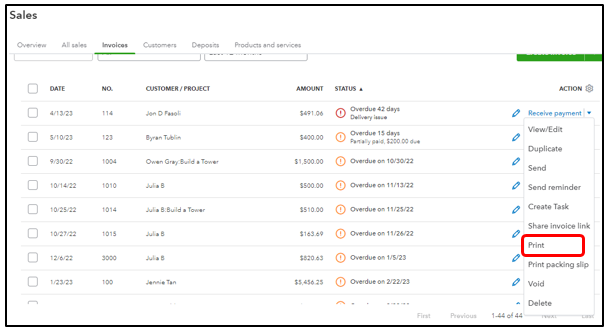
Also, the option to print out collection letters is unavailable in QuickBooks Online (QBO). You can only set up and send reminders instead to let your customers know their payments are due. And yes, you can print the invoice and manually create a collection letter. Refer to the screenshot below on how to print invoices.
Moreover, your feedback is definitely valuable to Intuit. It will be reviewed by our Product Development team and considered in future updates. You may follow the steps shared by my peer above on how to do it. Stay up-to-date with the latest news about your product by reviewing Intuit's Product Updates webpage.
Once your customer already paid their invoice, refer to this article on how to record it in QuickBooks: Record invoice payments in QuickBooks Online.
Let me know how it goes or if you have any follow-up questions. I'll be here if you need further assistance. Take care, and have a nice day.
I agree with Nicole N. How do you upgrade and remove functionality? All customers aren't tech savvy. I am not impressed with your new version.
I recognize how efficient it is for you to have the functionality in your account, Dee.
In QuickBooks Online (QBO), we cannot remove the functionality. However, there are features that you can turn on and off depending on your subscription.
With this, I'd suggest upgrading your subscription to have a broader functionality with QuickBooks.
Here's how:
For more detailed steps, please refer to this article: Upgrade or downgrade your QuickBooks Online subscription.
You can also check this article for future reference:
I've always got your back, so please keep your posts coming if you need further assistance managing your account. I'd be more than happy to assist you at any time.


You have clicked a link to a site outside of the QuickBooks or ProFile Communities. By clicking "Continue", you will leave the community and be taken to that site instead.
For more information visit our Security Center or to report suspicious websites you can contact us here


