Turn on suggestions
Auto-suggest helps you quickly narrow down your search results by suggesting possible matches as you type.
Showing results for
Get 50% OFF QuickBooks for 3 months*
Buy now
Thanks for posting here, @crystal-robex-co.
Let me help you reprint your 1099.
The steps to print 1099s depend on whether you e-filed or not. Choose the scenario that fits your situation. To make it easier, we'll show only the steps that apply to your product QuickBooks Online. if you already e-filed your 1099. Here's how
If you don’t see the archived or previously filed 1099, contact us to get a copy.
Form 1096 is not provided with your product. To get the same info, select View Summary to see a summary of your e-filed 1099s.
If you don’t e-file with Intuit, you need to file yourself. You must file 1099s with the IRS and in some cases your state. You may also be required to file Form 1096. You can e-file 1099s directly with the IRS using the Information Returns Intake System (IRIS). To learn more see E-file Forms 1099 with IRIS.
You can read this article for more info: Print your 1099 and 1096 forms.
To learn more about the commonly asked questions in 1099, check out this article: Get answers to your 1099 questions.
Click the Reply button below for additional 1099 printing questions. I'll be willing to help. Keep safe.
How do I reprint it on the 1099-NEC forms? You have to view each individually. You can't prepare the 1099 anymore since it's already be e-filed. I paid for QB to mail to my contractors but it hasn't been done and we are coming close to the deadline and no one at QB will call me back or answer my question.
How do we reprint 1099's? They've already been e-filed. If you view the 1099, you are viewing each individually. How do you reprint everyone on 1099 forms? I paid for QB to mail these to my contractors which they have not done yet, so I'm having to reprint these so they can receive them on time. QB doesn't return calls and can't answer my question.
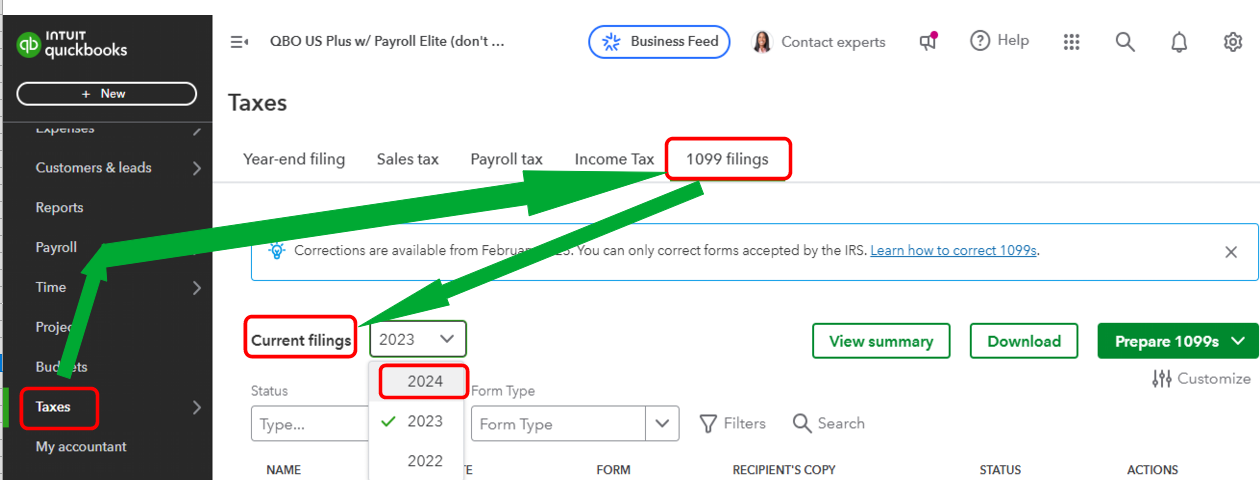
Hey there, @Arkansas Optometric Association. Your e-filed 1099 forms are in the Taxes tab, where you can print them. I'll provide the full instructions below.
By filtering the correct Status and Form Type, you can easily track and print them from the 1099 filings section. Here's how:
Check out this article for more information: Print your 1099 and 1096 forms.
I'll also add this article to help learn the common questions and answers about the 1099s form: Get answers to your 1099 questions.
Feel free to return here if you have additional questions about printing your 1099 form. We'll be here to assist you. Keep safe always.
Yes, but you can't print on 1099-NEC paper when doing it this way. Can you print these on plain paper and send out? Also, my contractors say "mailed" and have since 1/6/25, but they haven't been mailed out. I would know, since I'm one of them, and I've spoken to others. I've talked to QB and one person said they weren't being mailed until the 2nd week of February. That's not acceptable since they have to be out by the 31st.
Yes, Arkansas Optometric Association, you can print form 1099-NEC using only regular paper if you don't submit it to the IRS. However, if you are sending the form to the FED Agency, you can't print it on regular paper.
Moreover, if you've already invited your vendors to QuickBooks Workforce, they can check their 1099-NEC there. I'll provide the article below.
Regarding the contractors who were told that the forms were already mailed, but haven't already been mailed out, it's because it would take some time. The items will be mailed to the addresses provided in the contractors' profiles by January 31.
To know more about filing 1099-NEC in QuickBooks Online here's an article to help you to understand more: Year-end checklist for QuickBooks Online Payroll.
Furthermore, if you wish to change or correct some information in your 1099-NEC, here's an article to help you out: Correct or change 1099s in QuickBooks.
Should you have additional inquiries regarding your 1099 or any complexities concerning the product, please maintain communication. I am committed to delivering the most comprehensive assistance possible.


You have clicked a link to a site outside of the QuickBooks or ProFile Communities. By clicking "Continue", you will leave the community and be taken to that site instead.
For more information visit our Security Center or to report suspicious websites you can contact us here


